How Remotely Controlling UTorrent App
Hi..! my Hi5Zone readers.
Here is the very useful tutorial for the you.
I think many of you will use this remote Utorrent facility. You can put downloads in your home and control the utorrent app form the office.

1. Utorrent application.
2. A Webrowser
How To Configure Utorrent Remote Settings.
- To setup the utorrent remote connection Open the Utorrent application.
- Go to Options >Preferences or press Ctrl+P

1. Select Remote tab.
2. Tick the "Enable Utorrent Remote Access" box.
3. Fill up the "User name" ( Any you desired ).
4. Set a "Password".
5. Now press "Apply" to save the settings.
6. Now it takes few seconds to check and register your computer on the network.

- Then it prompts you to write the answer to a random security question.
- Write any answer and Press "Submit" button.

- Wait up to the status updated to Registered.
- Apply the settings.
- That's it you have successfully configured the remote connection for utorrent.
- Now its time to test wether its working or not?

Accessing U torrent Application Remotely.
- Go to the www.remote.utorrent.com

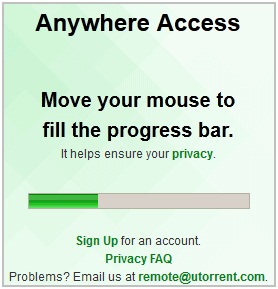
- Move your curser to fill-up the progress-bar.
- Write the User name & Password which you have already created.
- Press Login.
- After few seconds Utorrent Web App will appears

- See the Utorrent web app screen shot in the below image.

- You have the all options which available in the normal pc Utorrent app.
- See the some screen shots below.


How To Add A New Torrent File From Utorrent Web APP.
- Click the Add file Icon in the Toolbar.
- Upload the downloaded .torrent file. That's it it will start download automatically.
How To Set Force Start [F] Option.
- Right Click on the downloading torrent.
- Select the Force Start option.

How To Configure The Settings Of Utorrent Remotely.
- Click Settings button on the toolbar.
- Now Settings window will appear.
- Change the desired settings and press save button.
- See the settings screenshot below.

How To Control Utorrent From Your Smart Phone:
Download the Utorrent app from Android market.Repair Damaged OR Corrupted Word Documents
Sometimes word documents will get corrupted due to sudden power loss and some other reasons. When we try to open the document it displays some errors like..

- "Word cannot open the document."
- "Word cannot open the document: user does not have access privileges.
- "Word document is corrupted."
At this stage we loose all the data in the document. To recover the data form the document (*.doc) you need to download the Word Repair program.
How To Recover The Word Document
- Download Word Repair program form www.repairmyword.com.
- After downloading Open the program. ( No need to install it)
- Open the corrupted or damaged word document by clicking Repair/Open button.
- It will recover & show the data contains in the damaged file.
- Save the document without errors by clicking Save button.
for Windows PC Use USB Drive as Login Key
Password in Windows PC is one of best way to secure your PC from unauthorized access. But most of the time it was not easy to remember all those password to lock and unlock your windows PC. With Rohos Logon Key app you can use your USB drive as the login key for your PC, so you can unlock your PC easily with USB drive, without entering the password on login screen. So now you can use big passwords, without the need for remembering it. All is it possible with the free app.
Login with a USB Key is fully automatic and fast, and yet you don’t need to remember the lengthy password to login into your system. The app is totally 100% free and can be used on any USB drive, no need to purchase new USB drive.
How to Unlock Windows PC with USB Drive
1. Download the windows free app Rohos Logon Key on your PC and install it on your desktop, toget started.2. Open the app on your desktop and plug the USB device to your Windows PC.

3. Click on the “Setup USB Key” option to use your drive as a login key for the system.
4. Now all you have to do is the enter the windows Login password on the new pop windows to activate the USB key setup on your drive.


6. Go to the lock screen of your PC and plug the USB drive on your system and your PC will unlock within a seconds, no need to enter the password on the login screen.
7. You can disable the password any time from the app by clicking on the “Disbale Key” option from the app.
The app is totally free and work on Windows XP, Vista, Windows 7 and WIndows 8 PC smoothly. The app is one of the best way top secure your PC with USB drive.
Kaspersky Internet Security 2012
Kaspersky has already announced the new and latest version of its Internet Security pack named as free license keys of Kaspersky Internet Security 2012 which is one of the biggest fish and greatest success story of Antivirus software’s in terms of sales. You love the way Kaspersky Internet Security 2012 serial number performs scan and disable viruses.

It’s almost invisible while you work and seamless scanning makes your computer perform better than ever before. New version has stunning feature of capability to recover damage caused by malicious programs which is the most demanding feature on internet.
The main purpose of using internet now a days is to take benefit of online shopping and banking which ultimately saves your time and money. You don’t need to go outside in rain or sun and also you avoid heavy traffic jams which means that you can spend more time with your family and children.
What’s New
Its not the matter of protecting your system against know viruses, the true matter is to protect you against unknown malware which can any time enter into your system without any warning. For this Kaspersky Internet Security 2012 activation code uses cloud based technology which is actually based on people using this amazing software. This way they tell you about the emerging threats even before they reach you and damage your computer.Social networking threats are increasing day by day and in these cases spywares spread different messages on behalf of you to different profile resulting in damaging your reputation as well as credibility.
If somehow malware damage your system files and restarts your system than don’t worry because free product keys of Kaspersky Internet Security 2012 will ensure safe restart and recover all your lost files and folders.
Cyber-criminals are using phishing attacks now a days to take down the computers on different networks so in order to prevent your digital identity Kaspersky anti-phishing feature will let you stop almost any threat with the help of just a few click.
Screenshot

Features of Kaspersky Internet Security 2012:
1. Improved removal of incompatible applications during installation.2. The URL Adviser module has been enhanced.
3. Technologies of root-kit detection.
4. Application’s efficiency has been improved.
5. Interface has been re-designed.
6. Touch-screen support is added.
7. Intellectual system of updates downloading has been implemented.
8. Improved compatibility of Kaspersky URL Adviser.
9. Security by combining PC software with cloud-based services.
10. Easier to use than ever before.
How to Get Fully functional Trial Free for 90 Days.
1. Download Kaspersky 2012 from the link mention below.2. Install it but don’t register for trial version.
3. No need to put any key. Just install it.
4. You have activated 90 days trial.
Resources: Official website, Wikipedia
How to get fully functional Trial Free for 60 Days.
As mentioned before they had great success in terms of sales of Kaspersky Internet Security 2012 free license keys and that’s why they are giving away free 60 days fully functional trial. All you have to do is to visit their Promotional Page given at the end of this post and enter you personal information like your name, email etc and click on download button. No serial or License key is required in order to use the trial software. Just download the file, install it and enjoy it for 60 days without having to pay.Activation Code for 90 days license :QCGUH-J8FF6-33WGA-UBY62
Nokia Lumia
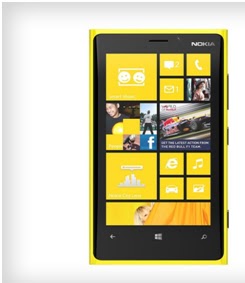
Nokia Lumia 920 supports a 4.5-inch IPS (in plane switching) TFT (Thin film transistor) touchscreen display. The display is integrated with PureMotion HD+ which ensures blur-free scrolling and better sunlight readability than its predecessors. lumia 920 is of 130.3mm height and 70.8mm width.
The Lumia 920 is powered by Windows Phone 8 and runs on a dual-core 1.5GHz Qualcomm Snapdragon S4 processor, making it the first in the family to feature dual-core technology. The company has announced only a 32GB version of the device, which has 1GB of RAM.
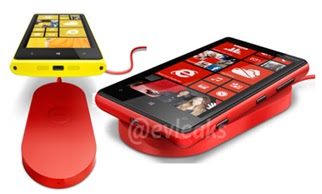 The phone features wireless charging, a feature that will appeal to those who frequently find themselves away from charging points. Along with that, the phone can transfer audio onto speakers just with a tap, owing to its NFC compatibility (Near field communication is a set of standards for smart phones and similar devices to establish radio communication with each other by touching them together or bringing them into close proximity), with the need of a cord. This feature will be restricted to a select line of speakers.
We don’t need to plug Nokia Lumia 920 in to charge it. Just put it on a wireless charger .It works on inductive charging . Inductive charging (also known as "wireless charging") uses an electromagnetic field to transfer energy between two objects.
CAMERA: Nokia Lumia has a 8.7 mega pixel (3264 x 2448 pixels resolution)
main camera. PureView technology with a Carl Zeiss lens captures blur-free videos even if the camera's shaking or in low light. The SmartShoot functionality in the Lumia 920 allows users to edit the image such that unwanted people and objects in the pictures are removed. The phone also has CinemaGraph, a feature that enables users to add motion into a still image.
VIEW FINDER : With City Lens you can discover all your city has to offer by looking at your camera's viewfinder.
HITS AND MISSES:
• The wireless charging is just as impressive as you want it to be in real life. You just plop your phone down on the stand it it starts charging.
• Internal memory of 1000mb.
• Near Field Communication
• Bluetooth 3.1
• Wi-Fi Channel bonding
• WLAN(wire less local are network) IEEE 802.11 a/b/g/n
• Qi Wireless charging.
• Lumia 920 is just as responsive and fast as the Galaxy S III and HTC One X.
• The only drawback is that it doesn`t have micro sd card slot.
• Available colors are yellow,red,black,grey,white.
• Needs less charging.

Lumia 920 is just as responsive and fast as the Galaxy S III and HTC One X.
However, the price and availability date of the phone weren't immediately available.
FAKE CAMERA TO CHAT EVERYWHERE.
Hi guys. This is very nice tutorial. I am really very enjoying this software. I've just uploaded it for you. It will create your fake camera on your PC. It works on any Windows version, like Windows XP, Windows 7 and Vista and all other. You can play a girl's movie in place of you web cam. So others will see it and think that they are really chatting with girl. Once you will have downloaded and installed this software you'll see this screen.
.jpeg)
Heheheheeh. :-) Don't worry it’s my cam opened in this software.
1. Here, on the top of software you can see two tabs, i) Effect ii) Source
2. Click the source tab and click movie from left side pane.
3. Add your movie clip. And start video call with anyone. He/she will see that girl's video as your camera
DOWNLOAD
Heheheheeh. :-) Don't worry it’s my cam opened in this software.
1. Here, on the top of software you can see two tabs, i) Effect ii) Source
2. Click the source tab and click movie from left side pane.
3. Add your movie clip. And start video call with anyone. He/she will see that girl's video as your camera
Best Way to Copy Files
All of us know that built-in file transfer system in Windows is so slow, it takes so much time to transfer files. Sometimes moving or copying big files is painful experience in Windows. But now you can supercharge the simple act of copying and pasting.
So today we come with the 3 apps which helps you to Copy files faster and easier, which will help you to replace Windows Explorer file copy and adds many features. These include transfer resuming, copy speed computation and control, improved copy progress display, copy list editable while copying, copy list saving/loading, and an error log.
Here are the 3 Ways to Copy files faster and easier
1. TeraCopy:
TeraCopy enables you to copy and move files faster and easier. Unlike the standard Windows copy/move options, TeraCopy can resume broken file transfers, skip and report bad files (without terminating the transfer) and calculate CRC check sums . Dynamically adjusted buffers reduce seek time when transferring files between two physical drives. Once installed, TeraCopy integrates with the Windows Explorer right-click menu and can also be set as the default copy handler.
2. Super Copier

3. Fast Copy

FastCopy is the Fastest Copy/Delete Software on Windows. It can copy/delete Unicode and over MAX_PATH(260byte) pathname files.
Subscribe to:
Posts (Atom)