Showing posts with label TIPS. Show all posts
Showing posts with label TIPS. Show all posts
Increase opportunities for Indian professionals in the U.S.
.jpg)
Washington. To attract global talent to the country's lawmakers in the U.S. for more than a quarter million Visa bill introduced in Congress is to be created. India and China to target highly skilled talent has brought this bill.
The name of the bill is 3.0startup. The conditional visa for 75 thousand migrant entrepreneurs and STEM [science, technology, engineering and mathematics] for the graduate students has been proposed to create 50 thousand visas. The talent from around the world will help to reach the United States. U.S. lawmakers who introduced the bill say it will create five million jobs.
Many of the top U.S. companies and organizations have given their support. These include Microsoft, Google, the National Small Business Association [Ansbia], Tech America, Information Technology Industry [ITI] and some others. Grimm MP, said: "We often stem educate the world's best talent. Belied by sending them back to countries like China and India to give up the chance to compete against the U.S.. The bill will help retain the best talent in America.Businesses in the U.S. and will create job opportunities for the people of the country. This increase U.S. competitiveness . "
Senator Warner said that while focusing on a comprehensive reform of migration, it is essential that we take steps in the global competition to the U.S. in the round of help attract talented entrepreneurs. The White House has welcomed the bill.
Increase opportunities for Indian professionals in the U.S.
Washington. To attract global talent to the country's lawmakers in the U.S. for more than a quarter million Visa bill introduced in Congress is to be created. India and China to target highly skilled talent has brought this bill.
The name of the bill is 3.0startup. The conditional visa for 75 thousand migrant entrepreneurs and STEM [science, technology, engineering and mathematics] for the graduate students has been proposed to create 50 thousand visas. The talent from around the world will help to reach the United States. U.S. lawmakers who introduced the bill say it will create five million jobs.
Many of the top U.S. companies and organizations have given their support. These include Microsoft, Google, the National Small Business Association [Ansbia], Tech America, Information Technology Industry [ITI] and some others. Grimm MP, said: "We often stem educate the world's best talent. Belied by sending them back to countries like China and India to give up the chance to compete against the U.S.. The bill will help retain the best talent in America.Businesses in the U.S. and will create job opportunities for the people of the country. This increase U.S. competitiveness . "
Senator Warner said that while focusing on a comprehensive reform of migration, it is essential that we take steps in the global competition to the U.S. in the round of help attract talented entrepreneurs. The White House has welcomed the bill.
Check whether your Computer is a Male or a Female?


How to do this?
Open a Notepad.
Type CreateObject("SAPI.SpVoice").Speak"hi i’m in love with you"
Save the notepad file as Computer Talk.vbs (make sure to choose “all files” to save as type option).
Close the notepad.
Now double click the newly created file to run it.
You will hear voice calling “hi I’m in love with you” :)
Dear Friends !!! I kindly request you all to LIKE our Facebook Fan Page.
LIKE us on Facebook & Get Daily updates Easily.
How to Recover Deleted Files
In this post I'm gonna discuss an easiest Data Recovery Method.

Sometimes we might have delete some important files accidentally and we need them back.
Today I'll show you a trick to recover your deleted files without using any 3rd party software. I'm not talking about restoring files from recycle bin.
This simple trick mostly works on Vista versions and all the Windows 7 versions.

 So let's see how to recover deleted file without using any software
 For example lets assume that you have permanently deleted "My Sweet Heart.JPG" from the folder named "My LIFE" ;) , and now you want to recover "My Sweet Heart.JPG" back.
Do this simple trick to recover your Sweet Heart.JPG
Right Click on the particular folder
Select "Restore previous versions"
That's all, now you will see a option to recover the particular file.

If you don't see "Restore previous Versions" by Right Clicking, Go to
Control Panel -->
System and Secutiry -->
System -->
Click on System Protection (in left sidebar) -->
Select the particular drive and Click Configure -->
Then select "Restore system setting and previous versions of files" -->
Now Click on OK
Note :
Previous versions come from restore points or from windows backup.
This trick will not work at all the time.
If you haven't get back your deleted files yet,
Use this Powerful Data Recovery Software (Recuva) to recover your deleted files.
Dear Friends !!! I'm kindly request you all to LIKE our Facebook Fan Page.
LIKE us on Facebook & Get Daily updates Easily.
6 Best Android Apps for Students

1. The Oxford Dictionary and Thesaurus for Android
.png) This helpful app will enable you to access a comprehensive dictionary and thesaurus on your smartphone. The app includes around 200,000 dictionary entries and no less than 300,000 synonyms. You will even be able to search online as well as download the entire dictionary onto your advanced mobile device Click here for play store
This helpful app will enable you to access a comprehensive dictionary and thesaurus on your smartphone. The app includes around 200,000 dictionary entries and no less than 300,000 synonyms. You will even be able to search online as well as download the entire dictionary onto your advanced mobile device Click here for play store.png) 2. Virt U: The Virtual University
2. Virt U: The Virtual UniversityThis clever little app allows you to view and download lectures from top American universities such as Harvard, Stanford and Berkeley on your mobile device. The app is free, so if you are hoping to brush up on a particular subject or simply learn something new and interesting then this Android app will almost certainly be of use to you.
Click here for play store
3. Studious

This app enables you to organize your lesson and homework schedule. After having filled out your class timetable it cleverly silences your phone automatically in order to ensure that you are not disturbed by unwanted interruptions. The app also reminds you about upcoming homework and examinations, all you have to do is remember to keep it up-to-date.
4. Droid Scan
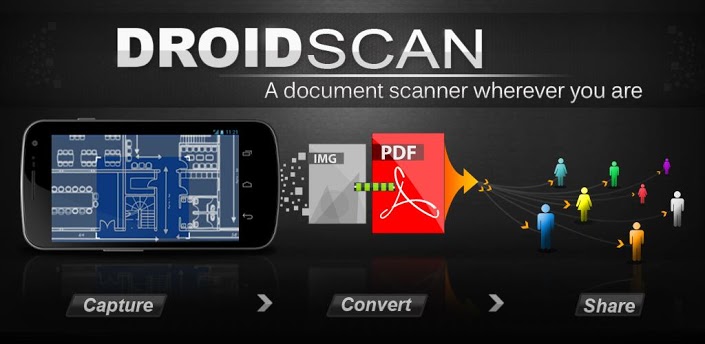
This is an incredibly useful Android apps thatallows you to use your camera phone as if it were a scanner. You will be able to transform photographs of text and images into high resolution documents to view, saveor share on your computer.
5. Alarm Clock Xtreme
.jpg)
This advanced alarm clock app works for just about anybody and will ensure that you do not miss or arrive late to your lectures. It includes a number of useful settings allowing you to be woken up gently or abruptly, as well as the option to set a maths equation to be solved before it will turn off in order to ensure that your mind is active and that you don't get back into bed afterwards. Alarm Clock Xtreme also features a countdown timer and reminder alarms that you can set during the day.
6. TradeStable
.jpg)
This great app from TradeStable.com.ng allows you to buy and sell used goods in Nigeria. It's completely for free, and easy to use, just post your ad and it will be seen by thousands of people every day.
These great Android apps will ensure that your time at college or university gets off to a great start. It is important that we use technology to our advantage and all of these great applications have something to offer to the modern-day student. So what are you waiting for? Get downloading! Also don't forget to check Tradestable.com.ng mobile to find good deals on used books..
like us at FaceBook fb.com/mastertech.co.cc
Download Facebook Videos Without Any Software
I think you don't need any description about Facebook. Usually most of the people use Internet download manager to download data or files from Internet , but in sometimes IDM will not catch Facebook videos.

So Here is simple trick to download Facebook videos through Google chrome extension.
First of all install this chrome extension on your browser:
CLICK HERE
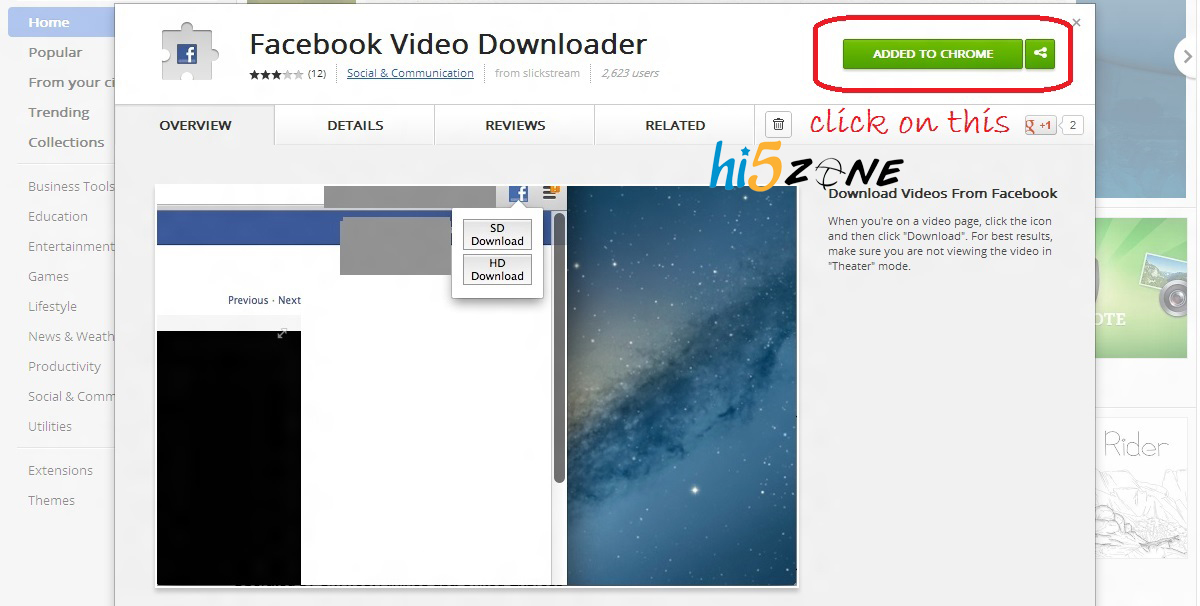 After the installation of Chrome extension, Click on any Facebook video and open it in a new tab
 Example: https://www.facebook.com/photo.php?v=421168804621097
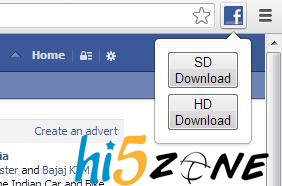
Then you will see Facebook icon your chrome tool bar Click on it.
[Click on SD Download/ HD Download]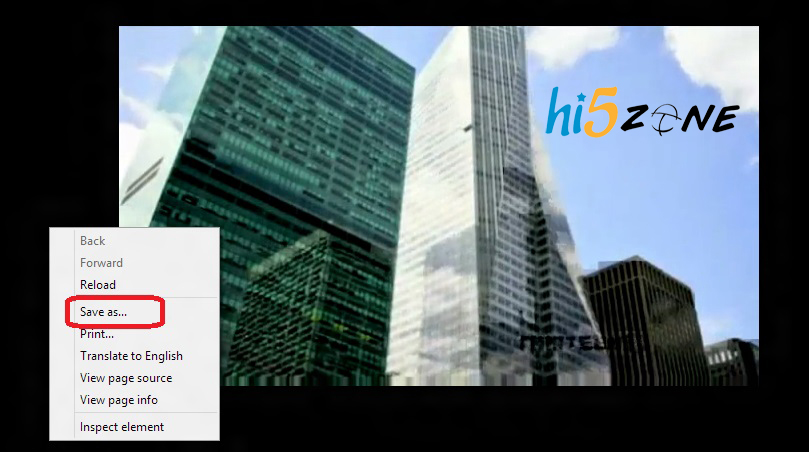
click SAVE AS
Then you will see Facebook icon your chrome tool bar Click on it.
[Click on SD Download/ HD Download]
click SAVE AS
It will start downloading...
like us on FACEBOOK
Add a Dislike button on Facebook.
 We all have thought of having a dislike button on Facebook. But till now Facebook haven't added it.
But don’t feel bad!!!
I'm here to help you guys add a 'Dislike' button on Facebook.
Just follow the given steps carefully...
Just follow the given steps carefully...

Step 1: Go to Status Magic. It's a Facebook app that is going to help you add your Dislike button.
https://apps.facebook.com/statusmagic/
Step 2: Now just type in your desired status in the ‘Update your status’ box and in the ‘Action button’ type Dislike.
And click on ‘share’ button.


In the Action Button instead of Dislike you can also add actions like 'Love', 'Cool', 'Hate', 'Awesome' or even 'WTF' and 'LoL'.
This trick is sure to amaze your friends!!!
Like us at FACEBOOK
Increase BROADBAND Speed
Hello friends,
Today i cam in front of you with common and simple topic.
when i brows the STW group in FB,
One of my friend asked me "how to increase the speed of BROADBAND?"

You just fallow the bellow steps.
Make sure your logged on as actually "Administrator".
Start->Run->type gpedit.msc
Make sure your logged on as actually "Administrator".
Start->Run->type gpedit.msc


Expand the "Administrative Templates" branch.

Expand the "Network Branch".
Highlight the "QoS Packet Scheduler" in left window.

In right window double-click the "Limit Reservable Bandwidth" setting.

On setting tab check the "Enabled" item.
Where it says "Bandwidth limit%" change it to read 0.

Effect is immediate on some systems, some need to re-boot. This is more of a "counter what XP does" thing. In other words, programs can request up to 20% of the bandwidth be reserved for them, even with QoS disabled
You done it :)
like us at FACEBOOK
Know Your Pending Requests in Your Facebook Account
Hello friends,
Today I’m back with interesting news.
Many of my friends are asking me how to know the pending requests in FACEBOOK.
So came to you on this topic.
Pending friend requests on Facebook are actually those requests which are not confirmed yet.
Yes we could see pending friend requests in “Edit Friends” in the “Settings“. But now it is unavailable. This is why we need to find alternative way to get view all unconfirmed or pending friend requests together.
There are a few alternative ways to view the all pending friend requests together in list. Out of them, I found the easiest way to use a Facebook app called “FriendRequests“. The location of this app is at apps.facebook.com/friendrequests . Once you allow this app to work with your profile, you can see all the friend requests you made before and forward those were not confirmed. See the screenshot of it on my account.
You just fallow the bellow steps to know the Pending friend requests in your Facebook account.
Click on GO TO APP

Click to ALLOW

To load your past pending friend requests, click the BULK LOAD button above, and follow the instructions

| A small window will popup (it may take 5-10 seconds to load) Click the text in the popup and type Ctrl-A (Command-A) to select all the text Type Ctrl-C (Command-C) to Copy the text to the clipboard Click inside this box and type Ctrl-V (Command-V) to Paste the text into this box Click the Load Friend Requests button  Now you can view your friend requests in your Facebook account.  If you want to cancel the request just click on their names just DO the fallowing thing  like us at FACEBOOK | ||
Have a Lot of Face Book Albums Download It as a Single File

Need to download all the photos from your friend's Face book album? Don't Worry!
You need not to download all the pictures one by one, you can download it as a single zip file..
It’s Easy & Free!
Just follow the steps below.
Download all photos from a Face book album in a single zip
Just follow the steps below.
*. Go to Facebook2zip.com
You need not to download all the pictures one by one, you can download it as a single zip file..
It’s Easy & Free!
Just follow the steps below.
Download all photos from a Face book album in a single zip
Just follow the steps below.
*. Go to Facebook2zip.com


*. Click on Go to apothem you will be navigated to another page.

*. Type your Friend’s name here and click next

*. Here you will find all the albums in your friend's profile loaded there, select the album you need to download.

*. Click download.
That's it you have done. Now go to download folder and you will see the album zip file there.
ENJOY!!!
connect us in facebook
Unlock Bsnl 3g Modem
Hello Friendz,

India finally has a good 3g coverage and many ISPare providing Internet through data card which use their SIM cards for pocket exchange and for making calls/SMS, most of the providers make their devices locked so that users can
only use their SIM card to access the web. In this post we bring you a easy method to unlock your BSNL 3g modem so that you can use other SIM cards also to access the web. This is done by a application called V-cell, this application is sold ebay for 400rs but we bring you this for FREE! Just follow the steps and unlock your device right now.
only use their SIM card to access the web. In this post we bring you a easy method to unlock your BSNL 3g modem so that you can use other SIM cards also to access the web. This is done by a application called V-cell, this application is sold ebay for 400rs but we bring you this for FREE! Just follow the steps and unlock your device right now.
1) Goto -Star -Run-regedit-HKEY_LOCAL_MACHINE\SOFTWARE\Wow6432Node\Linktop3G -> Set Engineer value 0
2)Copy the code below in notepad and save with the filename UnlockBSNL.reg
Windows Registry Editor Version 5.00
[HKEY_LOCAL_MACHINE\SOFTWARE\Wow6432Node\Linktop3G]
"Version"="V1"
@=""
"Engineer"=dword:00000000
Now save and double click to execute...
Tested By Experts And Fully Working.... :) :) :)
COMMENT BELOW IF YOU FACE ANY PROBLEM UNLOCKING
UNLOCK VODAFONE NET SETTER
Hello Friendz,
This is Easy Tutorial on k3770-z (ZTE)
Follow this given steps you can able to use any SIM on your stick
This is Easy Tutorial on k3770-z (ZTE)
Follow this given steps you can able to use any SIM on your stick

Step 1 :
Things You have to needed
1. USB Stick Vodafone K3770-z
2. VMB Software which contain all driver for your device
3. New Dashboard Software For Your Stick (which is available here)
4. Some 5-10min of Time to use this stick
Step 2:
Install device driver For your device to connect the stick with your PC
Step 3:
Make sure that you have successfully Uninstalled your VMB from your computer
Step 4:
Download this New Dashboard From here...
Download here
Password For This RAR File : jk
Step 5 :
Install this Software In your Computer & Open It
May be Reboot is needed in some Old PC's
Step 6 :
Now Connect your Stick in your computer
Step 7 :
After Detecting the network on this Software
Create Profile according to your SIM
For more information,
Here some APN given...
AIRTEL - airtelgprs.com
IDEA - internet
BSNL - bsnlnet
VODAFONE - www
AIRCEL - aircelgprs
TATA DOCOMO - tata.docomo.internet
UNINOR - uninor
1. USB Stick Vodafone K3770-z
2. VMB Software which contain all driver for your device
3. New Dashboard Software For Your Stick (which is available here)
4. Some 5-10min of Time to use this stick
Step 2:
Install device driver For your device to connect the stick with your PC
Step 3:
Make sure that you have successfully Uninstalled your VMB from your computer
Step 4:
Download this New Dashboard From here...
Download here
Password For This RAR File : jk
Step 5 :
Install this Software In your Computer & Open It
May be Reboot is needed in some Old PC's
Step 6 :
Now Connect your Stick in your computer
Step 7 :
After Detecting the network on this Software
Create Profile according to your SIM
For more information,
Here some APN given...
AIRTEL - airtelgprs.com
IDEA - internet
BSNL - bsnlnet
VODAFONE - www
AIRCEL - aircelgprs
TATA DOCOMO - tata.docomo.internet
UNINOR - uninor
Step 8:
You Have Done....
Now you can able to CONNECT to THE INTERNET
If this is not working for you then my other method will surely work for you...
For Any Problem or Some Issue Comment here or Mail me
I will try to solve that Problem..
I’m new here so, if you have any suggestion then comment here or mail me…..
Also can’t able to mail you each n every time so keep visiting or follow this blog….: P
Have a Gud Day!!!
COMMENT BELOW IF YOU FACE ANY PROBLEM UNLOCKING VODAFONE K3770z
Downgrade From Win7 To XP
With the Windows 7 Release Candidate expiration date is just a few days away, many of Windows 7 RC users are asking a way to downgrade to Windows XP/Vista. In this guide, we will show you how to downgrade from Windows 7 to XP.

And if you want to downgrade to Vista from Windows 7, please refer our how to downgrade from Windows 7 to Vista article.
1. Open your Windows 7 drive (usually C drive) and make sure that you haven’t deleted the Windows.old folder, which was created by Windows while installing Windows 7 on XP drive. Note that without the help of Windows.old folder you won’t be able to downgrade from Windows 7.


3. Insert your Windows 7 installation disc in the drive and reboot your machine. Press any key when prompted to do so.
4. Select your language, time, keyboard type and then hit Next button to continue.


D:
Md Win7
Move Windows Win7\Windows
Move "Program Files" "Win7\Program Files"
Move Users Win7\Users
Attrib –h –s –r ProgramData
Move ProgramData Win7\ProgramData
Rd "Documents and Settings"

move /y d:\Windows.old\Windows d:\
move /y "d:\Windows.old\Program Files" d:\
move /y "d:\Windows.old\Documents and Settings" d:\

E:\boot\bootsect /nt52 d:
(Where E is your DVD driver letter & D is OS drive letter)

Attrib –h –s –r boot.ini.saved
Copy boot.ini.saved boot.ini
12. Type Exit and reboot your machine to start using your Windows XP again. You are done! If you want to free up some disk space, delete Win7 folder in the root of your XP drive.
Good luck!
Subscribe to:
Posts (Atom)