Showing posts with label technology. Show all posts
Showing posts with label technology. Show all posts
How to Recover Deleted Files
In this post I'm gonna discuss an easiest Data Recovery Method.

Sometimes we might have delete some important files accidentally and we need them back.
Today I'll show you a trick to recover your deleted files without using any 3rd party software. I'm not talking about restoring files from recycle bin.
This simple trick mostly works on Vista versions and all the Windows 7 versions.

 So let's see how to recover deleted file without using any software
 For example lets assume that you have permanently deleted "My Sweet Heart.JPG" from the folder named "My LIFE" ;) , and now you want to recover "My Sweet Heart.JPG" back.
Do this simple trick to recover your Sweet Heart.JPG
Right Click on the particular folder
Select "Restore previous versions"
That's all, now you will see a option to recover the particular file.

If you don't see "Restore previous Versions" by Right Clicking, Go to
Control Panel -->
System and Secutiry -->
System -->
Click on System Protection (in left sidebar) -->
Select the particular drive and Click Configure -->
Then select "Restore system setting and previous versions of files" -->
Now Click on OK
Note :
Previous versions come from restore points or from windows backup.
This trick will not work at all the time.
If you haven't get back your deleted files yet,
Use this Powerful Data Recovery Software (Recuva) to recover your deleted files.
Dear Friends !!! I'm kindly request you all to LIKE our Facebook Fan Page.
LIKE us on Facebook & Get Daily updates Easily.
Top 25 Most Popular (Worst) Passwords of 2012
Hi Friends !!! Can you tell me, what is your Facebook account's password?
Are you scared of my question? Ok ok cool....
Today we will see something an important thing in passwords. Password means a secret word that ensures admission or acceptance by providing identity, membership, etc... We should create a strong passwords while working with internet related stuffs. If your using a poor password, definitely you will lose your account soon. The hackers can easily guess your passwords.
Recently Splash data released Top 25 Worst Passwords of 2012. That means these top 25 passwords are used most common by internet users and also hacker identified these password very easily.

Top 25 Worst Passwords
01. password
02. 123456
03. 12345678
04. abc123
05. qwerty
06. monkey
07. letmein
08. dragon
09. 111111
10. baseball
11. iloveyou
12. trustno1
13. 1234567
14. sunshine
15. master
16. 123123
17. welcome
18. shadow
19. ashley
20. football
21. jesus
22. michael
23. ninja
24. mustang
25. password1
These are the poor passwords of 2012, so if your using these type of password or if your password is related to above listed passwords, please changed it immediately and protect your online accounts from hackers.
Source: Splash data
Dear Friends !!! I kindly request you all to LIKE our Facebook Fan Page.
LIKE us on Facebook & Get Daily updates Easily.
WHATSAPP VS LINE


It is with Line when truly presented a tough opponent to Whatsapp, something no other seems to have achieved, bet operators to meet Whatsapp has apparently been forgotten at just days old, whose reason could be that is only available for Android by now.
Whatsapp, its advantages and disadvantages
No doubt I should begin by mentioning the biggest advantage that Whatsapp account, is that this is the most popular instant messaging in the world to date. That is why when purchasing just a Smartphone Whatsapp must be installed on your phone. It may sound excessive, but is that the biggest reason for doing this is that at least 90% of your contacts have the application and then you can start chatting with them.

But that reason is not the only thing that stands in Whatsapp, but have earned their rightful place thanks to have applications for each and every major mobile platforms of the moment: Android, iPhone, Windows Phone, BlackBerry, Symbian and Java2ME even , so that practically no Smartphone a user with which unreachable through this platform.
After the success of BlackBerry Messenger on RIM terminals undoubtedly the pioneer and best platform IM (instant messaging) that has existed, Whatsapp creators should have raised: “If BBM is so popular and successful? Why not do something similar but that works for everyone? "And boy did it.
WhatsApp allows users to communicate via messages, voice memos and send images, all via a data plan or a WiFi network, without using SMS messages (something very few remember now) and with a lot speed and fluidity because we are always connected . The application is free on all platforms for the first year, then this should be canceled an amount less than one dollar, although the "trial period" in Android and BlackBerry extends forever, and iOS only just uninstall and reinstall to install the app to get a free year more.
Perhaps the biggest drawback to this service is limited to only mobile phones and sending text messages, and multimedia files. Given this, from Japan arrives Line with qualities more than interesting.
Line, its advantages and disadvantages
This service comes in full swing from Asia, with the first goal at young people, as it has some nice features, no doubt, have been largely responsible for its success.

As seen in the screenshots, in Line not only have acquaintances smiles, but also with what they called Stickers, which are just larger and smilies that are incredibly animated nice and addictive to use to accompany any type of sentence, as the Japanese have been included in the application an enormous amount of these stickers in different libraries to download, some free and some pay few. I'm more than sure that many of the 250 million users of this application are in love with her because of the bizarre and funny stickers.
But make no mistake, the stickers are just the tip of the iceberg in Line, since this platform is not only available for iOS mobile devices, Android, BlackBerry and Windows Phone, but also has application for Windows and Mac desktop, plus a web version. This undoubtedly makes it much more attractive in appearance Whatsapp that we can continue our conversation from the computer without having to touch the phone and synchronize with your Smartphone. Superb.
Also, another great and very important feature is that Line allows voice calls via VoIP, so we can call and talk with our contacts from a Wi-Fi or 3G.
Finally, Line has some other applications available to complement their capabilities , such as "Line Camera "to add Stickers and effects to photos (which you can quickly share from Line), or " Line Card "," Birzzle Line "and" Brush Line "to make and send postcards, play with our contacts and paint, respectively.
The main disadvantage of Line is that although its growth has been astonishing year of life has not yet reached the popularity of Whatsapp, so currently it is impossible to completely changed the Japanese product.
Conclusions and Bono
Of the two, without a doubt my favorite is Line, thanks to all the advantages and developments representing over Whatsapp, certainly including the ability to make voice calls over the Internet, although the stickers and other characteristics are very attractive, no function is more useful than this.
However, as I mentioned earlier, it is impossible or very difficult to make a complete change to Line Whatsapp well want, because the former is steady as market leader and a huge amount of users, so a long time never miss my Smartphone.
As a bonus to this comparison, a new service that definitely caught my attention: Libon. This platform was launched by the operator Orange and represents an experience similar to but much easier Line, offering the ability to send short messages, multimedia files and call through VoIP, and on this, the call quality is incredibly good . It is free and also has a web version, plus "voicemail" and synchronization.
NICE DISK: Coffee Table of Giant 3.5" Floppy Disk

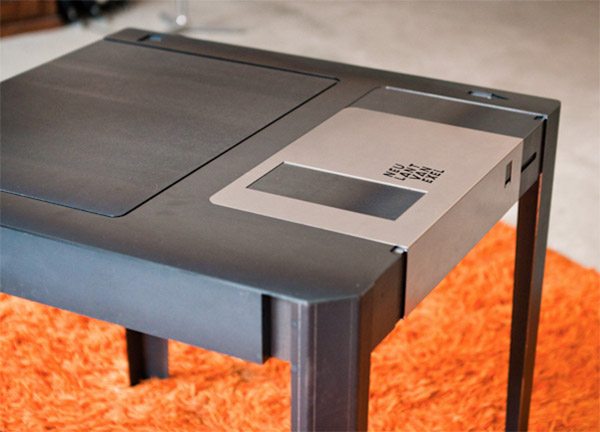
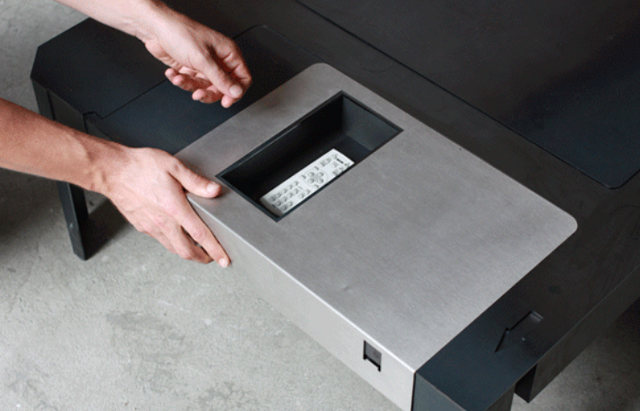
This is the floppy table a coffee table that looks like a giant 3.5" floppy disk. The metal protector even slides to the side to reveal a little storage space for your remotes/weed. That's pretty cool.
My roommate? He's the opposite of cool. Isn't that right, Derrek? He loves it when I talk about him online even if it's derogatory because it helps validate his otherwise meaningless existence. *rereading* Was that too mean? I'm joking, I don't even have a roommate. "But I'm right here." SHUT UP AND STAY IN YOUR ROOM.
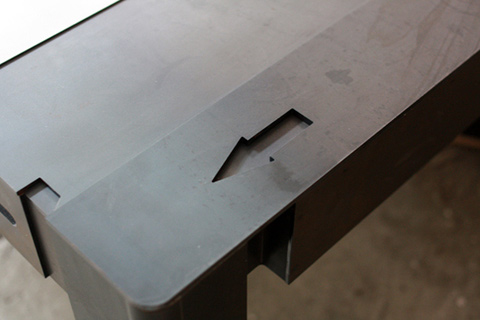
Hit the jump for a shot of the remote/weed compartment.
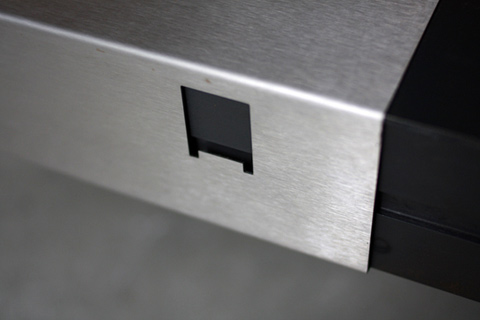
Thanks to who agree a 5 ¼" floppy coffee table that's actually floppy and bends when you put your feet on it would be even cooler.
Source : Geekologie
A REVIEW OF MICROSOFT HARDWARE 30-YEAR HISTORY
A couple of days there is an annual event that celebrates the hardware division, which always give a new perspective all taken during the year.

This special occasion was more than normal, because the division, which celebrated its 30-year history within Microsoft.
Its an overview of how they had been.
- 1982: Formed the Microsoft Hardware division in order to create the company's first mouse compatible with Microsoft Word.
- 1983: The first device from Microsoft in hardware is a reality, the Microsoft Mouse was born.
- 1993: After about 2 years of research trying to understand the first concepts of ergonomics, creating the Microsoft Mouse 2.0 the first ergonomic mouse ever.
- 1994: During this year, the main thing in designing peripherals was the comfort, the Natural Keyboard debuts as the first ergonomic keyboard from Microsoft.
- 1999: Offering the first significant development in mouse technology since the early sixties, Microsoft presents its first optical mice.
- 2002: Microsoft continues to lead the category of desktop peripherals unveiling the first set of keyboard mouse with Bluetooth technology.
- 2004: Microsoft creates the design Comfort Curve. A curve design encourages natural use of the hand and wrist position until today.
- 2006: Microsoft takes communications across the network to the next level with the launch of Life Cam webcams line and Life Chat headset optimized for Windows Live Messenger.
- 2008: Microsoft unveils its first mouse with Blue Track technology, which allows consumers to use them on any surface.
- 2010: During this year, Microsoft took a big leap in quality launched products like Arc Keyboard , Microsoft Arc Touch Mouse or line LifeCamStudio 1080p capable of recording HD.
- 2011: Microsoft introduces the Touch Mouse, the first mouse designed for multitouch Windows 7 .

During this year, Microsoft has released the Life Cam and Life Chat first devices certified for use with Skype. In addition, the company has expanded its collection of artist edition mice, launched its new line Sculpt and updated the Touch Mouse for use in Windows 8 .
The team at Microsoft Hardware us that the first products to be launched next year will be directed in the line of communications with Skype, artist editions and renewal of the range multitouch support Windows 8.
During the event we could try the latest peripherals that had created the company in view of this Christmas, as the family Wedge, from which we will soon depth analysis.
Go back to win7 from the windows. Old folder.
It is probably easiest for you to restore from windows.old
You need a boot disc you can see what you are doing.
Plenty of linux live cd's out there.
Here are screenshots from when I did it. I used my winpe disc with explorer included ( that's why you can see the aero transparency ).
If you have secure boot enabled - you will need to disable it in Bios setup.
From your boot disc - this is what your Windows 8 drive looks like:

This is what the windows.old folder contains:


Look in windows 8 drive Users\yourusername and copy the files I highlighted below into Windows.old Users\yourusername

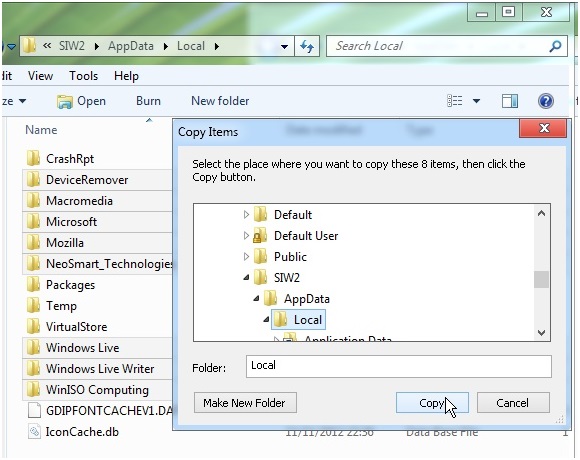
Do the same for Appdata\Roaming


MOVE ALL the highlighted folders into WINDOWS.EIGHT.

MOVE ALL the folders from Windows.old onto the root of the drive
You now have this and can reboot into windows 7.

You may also need to re enable services - your A/V for example- Windows 8 upgrade process will have disabled a few things.
Useful way to do that is to open msconfig>services tab>hide all MS services >enable all.
FACEBOOK COULD BUY WHATSAPP
Facebook may have started talks with the company responsible for the implementation of mobile instant messaging world's most widespread, WhatsApp .

Although this information has to be taken very carefully because it could be a hoax, according tosources close have commented on TechCrunch, the social network would be studying the potential purchase , and the potential benefits in the short and long term.
In Facebook are clear that the way to reach the next billion active users is betting big on mobile platforms, where precisely WhatsApp is enthroned in the field of instant messaging, despite the recent arrival of services such as Line .
WhatsApp is one of the key points that Facebook still wants to improve their internationalization inemerging markets. The messaging application, which is currently looking for translators of various languages , has users in over one hundred countries covering 750 mobile networks through iOS, Android, Blackberry, Windows Phone or Symbian.
Confirmed the acquisition of some of the parts, besides getting the opening of new markets and millions of users, Facebook would get great benefits from every purchase directly undertake the application users.
Remember that Facebook already ventured into the world of mobile applications with the purchase of Instagram for a final price of 715 million euros .
Although so far none of the two companies have confirmed or denied these potential purchase plans, certainly that would be conducted fairly surprising because the basic principles by which Whatsapp has been so successful.
Ironically, WhatsApp explicitly repudiated advertising as a revenue source that could work in your favor when negotiating purchase. Meanwhile, all know as Facebook has risen prominently and even intrusive advertising as a way to get a significant amount of revenue.
Without going any further, Jan Koum, WhatsApp cofounder, wrote this year in a post on the company:
Advertising is not only an interruption of aesthetics, is an insult to intelligence. In every company that sells ads, an important part of their engineering team spends the day packing the user's personal data to better reach your advertising, instead of writing better code. When it comes to advertising the user is treated as a product.
And not just these words by WhatsApp which would make it a surprise this acquisition . On other occasions, has publicly Jan Koum disgust you supposed to see that startups sell quickly before the money power of the big companies.
Section 66A Of The Information Technology Act: A Provision Ultra Vires The Indian Constitution

The nation is understandably outraged at the way two girls in Maharashtra were arrested for expressing themselves on Facebook (I can empathize with them, for I myself am very vocal about such issues on that very social networking site), condemning the forced bandh in Mumbai after Bal Thackeray’s death (one had posted the status and the other only ‘liked’ it), and earlier, how a man was arrested for tweeting against Chidambaram’s son. While the law enforcement agencies are to blame, in this case, so is the letter of the law, and the problematic provision is Section 66A of the Information Technology (IT) Act.
In an article I wrote, I defended the sedition law, saying that reasonable restraints to the freedom of speech and expression, as laid down in Article 19(2) of the Indian constitution or Article 19(3) of the International Covenant on Civil and Political Rights (ICCPR), to which India is a signatory, are justified and democracy can’t be allowed to sound a death-knell to itself, misuse of the law, such as by detaining a cartoonist ridiculing the Parliament (he may have been ridiculing our MPs and not parliamentary democracy as such) notwithstanding.
I also support the provision in the Indian Penal Code (IPC), Section 295A to be precise, that classifies outraging religious sentiments as an offence. A civil critique of faith is different from outraging sentiments, and the anti-Islam film made in the US, for instance, in my opinion, should be banned in India, but not to say, a film like The Da Vinci Code, that doesn’t demonize Christ. This is not to say that I am not open to a critique of Ram, Krishna, Jesus or Muhammad, but it should be civil and free from ridicule or abuse, and in that spirit, I am not against Jethmalani’s remarks on Wahabi Islam a few years back or Ram more recently. Again, Section 295A of the IPC has also been misused against the girls who criticized the Mumbai bandh in addition to Section 66A of the IT Act, but how that relates to outraging religious sentiments is beyond me; yet, the possibility of misuse does not make a law redundant by itself.
So, in spite of not having fanatic views on free speech to the extent of being classified as a “liberal fundamentalist” (yes, this terminology is used!), why do I say that Section 66A of the IT Act is unconstitutional? The answer is simple – it doesn’t fall within the ambit of reasonable restrictions to the right to freedom of speech and expression mentioned in Article 19(2) of the Indian constitution. Let us have a look at Section 66A of the IT Act first. Here’s what it says –
“Punishment for sending offensive messages through communication service, etc. – Any person, who sends, by means of a computer resource or a communication device,-
(a) Any information that is grossly offensive or has menacing character; or
(b) any information which he knows to be false, but for the purpose of causing annoyance, inconvenience, danger, obstruction, insult, injury, criminal intimidation, enmity, hatred, or ill will, persistently makes by making use of such computer resource or a communication device,
(c) Any electronic mail or electronic mail message for the purpose of causing annoyance or inconvenience or to deceive or to mislead the addressee or recipient about the origin of such messages
shall be punishable with imprisonment for a term which may extend to three years and with fine.
(a) Any information that is grossly offensive or has menacing character; or
(b) any information which he knows to be false, but for the purpose of causing annoyance, inconvenience, danger, obstruction, insult, injury, criminal intimidation, enmity, hatred, or ill will, persistently makes by making use of such computer resource or a communication device,
(c) Any electronic mail or electronic mail message for the purpose of causing annoyance or inconvenience or to deceive or to mislead the addressee or recipient about the origin of such messages
shall be punishable with imprisonment for a term which may extend to three years and with fine.
Explanation: For the purposes of this section, terms ‘Electronic mail’ and ‘Electronic Mail Message’ means a message or information created or transmitted or received on a computer, computer system, computer resource or communication device including attachments in text, image, audio, video and any other electronic record, which may be transmitted with the message.”
Now, let us have a look at Article 19(2) of the Indian constitution. It allows reasonable restrictions “in the interests of the sovereignty and integrity of India, the security of the State, friendly relations with foreign States, public order, decency or morality or in relation to contempt of court, defamation or incitement to an offence”.

Next, let us evaluate Section 66A by this yardstick. Clause (a) is too vague and ambiguous. Clause (b), to a great extent, is reasonable because it mostly squarely falls within the scope of reasonable restrictions in relation to defamation. Clause (c), however, is the strangest provision that allows, in clear terms, merely “causing annoyance or inconvenience” to be a crime! Is this democratic by any means? And yes, clause (a) is also undemocratic, for the room it leaves. As for clause (b), defamation exists in India under the law of torts as also under the IPC, as defined in Section 499, and the punishment for it as a crime, as mentioned in Section 500 of the IPC, is imprisonment for up to two years, fine or both, and as for tortious defamation, the tortfeasor would have to pay compensation to the person he/she has maligned, and so, there is no reason for this to figure in the IT Act.
Worse still, for all these activities classified in this provision, the punishment straight away is imprisonment for three years, which is certainly draconian, going against the principles of fairness and reasonableness outlined in the landmark Wednesbury case in England and endorsed by the Maneka Gandhi case in India, even if by some absolutely bizarre logic, annoying or inconveniencing someone is a crime!
I am sure some human rights lawyers would file a writ petition in the Supreme Court under Article 32 of the constitution to have Section 66A of the IT Act struck down under Article 13(2) of the constitution, which states – “The State shall not make any law which takes away or abridges the rights conferred by this Part and any law made in contravention of this clause shall, to the extent of the contravention, be void.” The ‘Part’ referred to is Part III of the constitution, which contains the fundamental rights, including the right to freedom of speech and expression contained in Article 19(1)(a), and the apex court in its wisdom would take the necessary steps, even though Mr. Sibal, the IT Minister, seems to be in no mood to concede that this provision introduced by the UPA back in 2008, is blatantly unjust (for reference, please see this video, that also points to how Shiv Sainiks vandalized a clinic run by an uncle of one of the girls, which is hardly surprising, given the past record of that party).
It’s a test for Indian democracy now, and if we don’t act soon enough to protect our democratic character, then we may set in motion a historical process culminating in disastrous consequences.
Best Way to Copy Files
All of us know that built-in file transfer system in Windows is so slow, it takes so much time to transfer files. Sometimes moving or copying big files is painful experience in Windows. But now you can supercharge the simple act of copying and pasting.
So today we come with the 3 apps which helps you to Copy files faster and easier, which will help you to replace Windows Explorer file copy and adds many features. These include transfer resuming, copy speed computation and control, improved copy progress display, copy list editable while copying, copy list saving/loading, and an error log.
Here are the 3 Ways to Copy files faster and easier
1. TeraCopy:
TeraCopy enables you to copy and move files faster and easier. Unlike the standard Windows copy/move options, TeraCopy can resume broken file transfers, skip and report bad files (without terminating the transfer) and calculate CRC check sums . Dynamically adjusted buffers reduce seek time when transferring files between two physical drives. Once installed, TeraCopy integrates with the Windows Explorer right-click menu and can also be set as the default copy handler.
2. Super Copier

3. Fast Copy

FastCopy is the Fastest Copy/Delete Software on Windows. It can copy/delete Unicode and over MAX_PATH(260byte) pathname files.
Result of research photos to Facebook
Oregon State University ichthyologist Brian Sidlauskas led a research expedition into the little-known Cuyuni River region of Guyana in South America. His team documented more than 5,000 fish, but Guyana’s immigration policies required them to identify and catalog every specimen they wanted to bring back—a nearly impossible task, especially on a tight schedule. Sidlauskas uploaded his research photos to Facebook and tagged members of the scientific community who were able to identify almost all of the photos in under 24 hours.

It’s about hard disks work
If you are to dismantle the hard disk drive by opening the top casing (after removing all
the necessary screws), the first thing you'll see is a spindle holding one or a number of mirror-like hard rotating platters (commonly called data platter). The platters could be made to spin at an extremely high speed, technically between 5,400 to 10,000 revolutions per minute (RPM). An extremely thin
magnetic coating is layered onto the surface of the platter that is polished to mirror-type smoothness.
The platter is usually made of glass or ceramic
(modern platter may use titanium). Unlike a floppy disk, the platter cannot be bent or flipped and hence we coin it as "hard disk" or "hard drive". Commonly a hard disk contains 1 to 10 identical platters that are stacked in parallel to form a cylinder. There is usually one Read Write (RW) head designated per platter face, and each head is attached to a single actuator shaft which moves all heads in unison and performs a uniform synchronous motion during reading or writing of data.
Data on a hard disk is stored in microscopic areas called magnetic domains on the magnetic material. Each domain stores either a 1 or 0 value. Similar to a floppy disk, a hard disk records its data in concentric circles or tracks, which are numbered from the outermost edge to the innermost edge of the platter. These tracks are further subdivided into smaller units called sectors which typically store 512 bytes of data each. Zoning may be needed to further optimist the data storage as the outer circumference would normally pack more sector units than the inner circumference.
The RW head is the key component that performs the reading and writing functions. It is placed on a slider which is in term connected to an actuator arm which allow the RW head to access various parts of the platter during data IO functions by sliding across the spinning platter.
The sliding motion is derived by passing a current through the coil which is part of the actuator-assembly. As the coil is placed between two magnets, the forward or backward sliding motion is hence derived by simple current reversal. This location of the platter (just like the landmark along the road) is identified and made possible by the embedded servo code written on the platter.
It is therefore easy to understand that if the RW head happens to "knock" on the spinning platter out of design specification, a Read Write head crash occurs.
When the computer is switched off, the head is usually pulled to a safe parking zone to prevent the head from scratching against the data zone on platter when the air bearing subsides. This process is called a parking and different techniques have been implemented in various hard disks to handle the take offs and landings. In a Ramp load/unload design, a lifting mechanism parks the head outside of the platter onto a "parking bay" prior to a shutdown. It then automatically unpacks and relocates itself above the disk platter when the platter spins up to appropriate rotational speed.

There're two popular ways to measure the performance of a hard disk:
Data Rate
Data rate is also known as data transfer rate or throughput. It refers to the speed with which the data can be transmitted from one device to another. Data rates are commonly measured in megabytes (MB) per second. The data rates for a typically hard disk ranges between 5 to 40 megabytes per second.
Seek Rate
Seek time refers to the total span of time between a file request by the CPU to the point when the first byte of the file is sent to the CPU. This is one of the several delays associated with reading or writing data on a computer's disk drive. In order to read or write data in a particular place on the disk, the read/write head needs to man-oeuvre to the precise location of the disk platter. This process is known as "seeking", and the time it takes for the head to move to the right place is referred to the "seek time". A typical seek time for a hard disk is about 9 to 15.
S.M.A.R.T
Majority of all hard disk today support a technology known as S.M.A.R.T. (Self-Monitoring, Analysis, and Reporting Technology) which helps to predict imminent disk failures so that users can be alerted to take preventive actions before the disk fails completely.
 Internal of a hard disk drive |
magnetic coating is layered onto the surface of the platter that is polished to mirror-type smoothness.
The platter is usually made of glass or ceramic
(modern platter may use titanium). Unlike a floppy disk, the platter cannot be bent or flipped and hence we coin it as "hard disk" or "hard drive". Commonly a hard disk contains 1 to 10 identical platters that are stacked in parallel to form a cylinder. There is usually one Read Write (RW) head designated per platter face, and each head is attached to a single actuator shaft which moves all heads in unison and performs a uniform synchronous motion during reading or writing of data.
Data on a hard disk is stored in microscopic areas called magnetic domains on the magnetic material. Each domain stores either a 1 or 0 value. Similar to a floppy disk, a hard disk records its data in concentric circles or tracks, which are numbered from the outermost edge to the innermost edge of the platter. These tracks are further subdivided into smaller units called sectors which typically store 512 bytes of data each. Zoning may be needed to further optimist the data storage as the outer circumference would normally pack more sector units than the inner circumference.
 Read Write Head
The RW head is the key component that performs the reading and writing functions. It is placed on a slider which is in term connected to an actuator arm which allow the RW head to access various parts of the platter during data IO functions by sliding across the spinning platter.
The sliding motion is derived by passing a current through the coil which is part of the actuator-assembly. As the coil is placed between two magnets, the forward or backward sliding motion is hence derived by simple current reversal. This location of the platter (just like the landmark along the road) is identified and made possible by the embedded servo code written on the platter.
Flying Height
To write a piece of information to the disk, an electromagnetic flux is transmitted through the head which hovers very closely to the platter. The RW head suspends on a thin cushion of air which the spinning platter induces. This designed distance between the head and platter is called the flying height. It can literally measure to a few millionths of an inch. A good analogy is to try to imagine flying a Boeing 747 with about 6 inches above ground level.It is therefore easy to understand that if the RW head happens to "knock" on the spinning platter out of design specification, a Read Write head crash occurs.
Read Write Function of Disk
As the head writes data onto the disk, it changes its magnetic polarization to induce either a one or zero value. During a read request, data is interpreted when the magnetic fields on the platter brings about an electrical change (as a result of change in electrical resistance of some special material property) in the read-head that passes over it. These electrical fields are then encoded and transmitted to the CPU to be processed and read by the system.Parking of RW Head
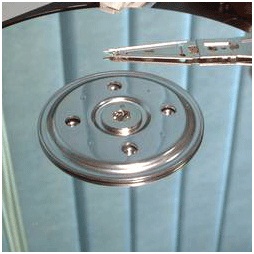 The read/write head will move to the parking zone when the computer is switched off. |
Hard Disk Controller PCB Board
A hard disk also contains a pcb controller circuit board that regulates data traffic. It ensures massive data to be streamed in and out of the disk smoothly. A logic board that sits under the drive controls and connects the spindle, head actuator, and various disk functions of the disk. Embedded with a micro-controller, it executes self-diagnostics test and cleans up data working area in the memory and all internal chip bus in the hard drive when it powers up.Hard Disk Parts Overview
Today's Disk and Data
Storage capacity is measured in terms of GB (Gigabyte). 1 GB roughly equals to 1000 MB (Megabyte). A typical desktop machine purchased today carries a hard disk of at least 80 to 400 gigabyte. Computer data is stored onto the disk logically in the form of files or simply, a string of bytes. When a program requests for a file, the hard disk retrieves its bytes and sends them to the CPU to be processed.There're two popular ways to measure the performance of a hard disk:
Data Rate
Data rate is also known as data transfer rate or throughput. It refers to the speed with which the data can be transmitted from one device to another. Data rates are commonly measured in megabytes (MB) per second. The data rates for a typically hard disk ranges between 5 to 40 megabytes per second.
Seek Rate
Seek time refers to the total span of time between a file request by the CPU to the point when the first byte of the file is sent to the CPU. This is one of the several delays associated with reading or writing data on a computer's disk drive. In order to read or write data in a particular place on the disk, the read/write head needs to man-oeuvre to the precise location of the disk platter. This process is known as "seeking", and the time it takes for the head to move to the right place is referred to the "seek time". A typical seek time for a hard disk is about 9 to 15.
S.M.A.R.T
Majority of all hard disk today support a technology known as S.M.A.R.T. (Self-Monitoring, Analysis, and Reporting Technology) which helps to predict imminent disk failures so that users can be alerted to take preventive actions before the disk fails completely.
Blue Teeth became Bluetooth
Looking after your Teeth

By the way if, you're wondering where the Bluetooth name originally came from, it named after a Danish Viking and King, Harald Blåtand (translated as Bluetooth in English), who lived in the latter part of the 10th century. Harald Blåtand united and controlled Denmark and Norway (hence the inspiration on the name: uniting devices through Bluetooth).
He got his name from his very dark hair which was unusual for Vikings, Blåtand means dark complexion. However a more popular, (but less likely reason), was that Old Harald had a inclination towards eating Blueberries , so much so his teeth became stained with the colour, leaving Harald with a rather unique set of molars. And you thought your teeth were bad...
Blueberries and Harald Blåtand's teeth,
so these Blue Teeth became Bluetooth
Bluetooth
Well it isn't some strange form of tooth decay as you might initially imagine. Bluetooth is the name of a new technology that is now becoming commercially available. It promises to change significantly the way we use machines.
Bluetooth technology was designed primarily to support simple wireless networking of personal consumer devices and peripherals, including cell phones, PDAs, and wireless headsets. Wireless signals transmitted with Bluetooth cover short distances, typically up to 30 feet (10 meters). Bluetooth devices generally communicate at less than 1 Mbps.
Bluetooth networks feature a dynamic topology called a piconet or PAN. Piconets contain a minimum of two and a maximum of eight Bluetooth peer devices. Devices communicate using protocols that are part of the Bluetooth Specification. Definitions for multiple versions of the Bluetooth specification exist including versions 1.1, 1.2 and 2.0.
Although the Bluetooth standard utilizes the same 2.4 Ghz range as 802.11b and 802.11g, Bluetooth technology is not a suitable Wi-Fi replacement. Compared to Wi-Fi, Bluetooth networking is much slower, a bit more limited in range, and supports many fewer devices.
As is true for Wi-Fi and other wireless technologies today, concerns with Bluetooth technology include security and interoperability with other networking standards. Bluetooth was ratified as IEEE 802.15.1.
Uses
That was the original idea, but the originators of the original idea soon realised that a lot more was possible. If you can transmit information between a computer and a printer, why not transmit data from a mobile phone to a printer, or even a printer to a printer?. The projected low cost of a Bluetooth chip (~$5), and its low power consumption, means you could literally place one anywhere.
Ideas, ideas...
With this viewpoint interest in Bluetooth is soaring, lots of ideas are constantly emerging, some practical and feasible e.g.: Bluetooth chips in freight containers to identify cargo when a lorry drives into a storage depot, or a headset that communicates with a mobile phone in your pocket, or even in the other room, other ideas not so feasible: Refrigerator communicating with your Bluetooth-enabled computer, informing it that food supply is low, and to inform the retailer over the internet.
Subscribe to:
Posts (Atom)