Showing posts with label Google. Show all posts
Showing posts with label Google. Show all posts
How to Recover Deleted Files
In this post I'm gonna discuss an easiest Data Recovery Method.

Sometimes we might have delete some important files accidentally and we need them back.
Today I'll show you a trick to recover your deleted files without using any 3rd party software. I'm not talking about restoring files from recycle bin.
This simple trick mostly works on Vista versions and all the Windows 7 versions.

 So let's see how to recover deleted file without using any software
 For example lets assume that you have permanently deleted "My Sweet Heart.JPG" from the folder named "My LIFE" ;) , and now you want to recover "My Sweet Heart.JPG" back.
Do this simple trick to recover your Sweet Heart.JPG
Right Click on the particular folder
Select "Restore previous versions"
That's all, now you will see a option to recover the particular file.

If you don't see "Restore previous Versions" by Right Clicking, Go to
Control Panel -->
System and Secutiry -->
System -->
Click on System Protection (in left sidebar) -->
Select the particular drive and Click Configure -->
Then select "Restore system setting and previous versions of files" -->
Now Click on OK
Note :
Previous versions come from restore points or from windows backup.
This trick will not work at all the time.
If you haven't get back your deleted files yet,
Use this Powerful Data Recovery Software (Recuva) to recover your deleted files.
Dear Friends !!! I'm kindly request you all to LIKE our Facebook Fan Page.
LIKE us on Facebook & Get Daily updates Easily.
Top 25 Most Popular (Worst) Passwords of 2012
Hi Friends !!! Can you tell me, what is your Facebook account's password?
Are you scared of my question? Ok ok cool....
Today we will see something an important thing in passwords. Password means a secret word that ensures admission or acceptance by providing identity, membership, etc... We should create a strong passwords while working with internet related stuffs. If your using a poor password, definitely you will lose your account soon. The hackers can easily guess your passwords.
Recently Splash data released Top 25 Worst Passwords of 2012. That means these top 25 passwords are used most common by internet users and also hacker identified these password very easily.

Top 25 Worst Passwords
01. password
02. 123456
03. 12345678
04. abc123
05. qwerty
06. monkey
07. letmein
08. dragon
09. 111111
10. baseball
11. iloveyou
12. trustno1
13. 1234567
14. sunshine
15. master
16. 123123
17. welcome
18. shadow
19. ashley
20. football
21. jesus
22. michael
23. ninja
24. mustang
25. password1
These are the poor passwords of 2012, so if your using these type of password or if your password is related to above listed passwords, please changed it immediately and protect your online accounts from hackers.
Source: Splash data
Dear Friends !!! I kindly request you all to LIKE our Facebook Fan Page.
LIKE us on Facebook & Get Daily updates Easily.
6 Best Android Apps for Students

1. The Oxford Dictionary and Thesaurus for Android
.png) This helpful app will enable you to access a comprehensive dictionary and thesaurus on your smartphone. The app includes around 200,000 dictionary entries and no less than 300,000 synonyms. You will even be able to search online as well as download the entire dictionary onto your advanced mobile device Click here for play store
This helpful app will enable you to access a comprehensive dictionary and thesaurus on your smartphone. The app includes around 200,000 dictionary entries and no less than 300,000 synonyms. You will even be able to search online as well as download the entire dictionary onto your advanced mobile device Click here for play store.png) 2. Virt U: The Virtual University
2. Virt U: The Virtual UniversityThis clever little app allows you to view and download lectures from top American universities such as Harvard, Stanford and Berkeley on your mobile device. The app is free, so if you are hoping to brush up on a particular subject or simply learn something new and interesting then this Android app will almost certainly be of use to you.
Click here for play store
3. Studious

This app enables you to organize your lesson and homework schedule. After having filled out your class timetable it cleverly silences your phone automatically in order to ensure that you are not disturbed by unwanted interruptions. The app also reminds you about upcoming homework and examinations, all you have to do is remember to keep it up-to-date.
4. Droid Scan
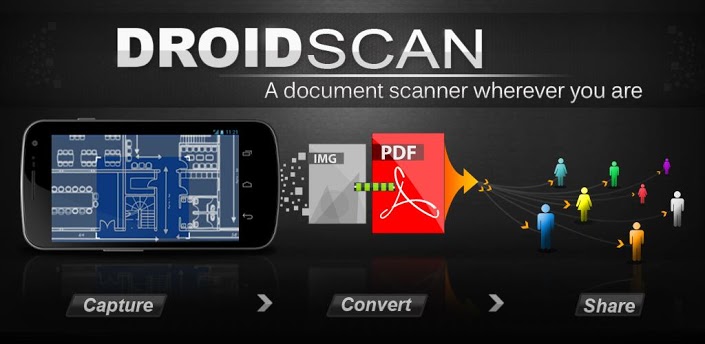
This is an incredibly useful Android apps thatallows you to use your camera phone as if it were a scanner. You will be able to transform photographs of text and images into high resolution documents to view, saveor share on your computer.
5. Alarm Clock Xtreme
.jpg)
This advanced alarm clock app works for just about anybody and will ensure that you do not miss or arrive late to your lectures. It includes a number of useful settings allowing you to be woken up gently or abruptly, as well as the option to set a maths equation to be solved before it will turn off in order to ensure that your mind is active and that you don't get back into bed afterwards. Alarm Clock Xtreme also features a countdown timer and reminder alarms that you can set during the day.
6. TradeStable
.jpg)
This great app from TradeStable.com.ng allows you to buy and sell used goods in Nigeria. It's completely for free, and easy to use, just post your ad and it will be seen by thousands of people every day.
These great Android apps will ensure that your time at college or university gets off to a great start. It is important that we use technology to our advantage and all of these great applications have something to offer to the modern-day student. So what are you waiting for? Get downloading! Also don't forget to check Tradestable.com.ng mobile to find good deals on used books..
like us at FaceBook fb.com/mastertech.co.cc
Last one Minute
Think the world comes to end

If this is the least Minute of your life want to know What happened in last one minute?

Image credit: Flicker Earls37a
For many people, there is no value of time but on other side there are many people who think every single second is precious.
In this post, we are going to compile some interesting facts and figures that are going to happen in 'last one minute round the world'.
By reading all these facts you’ll come to know the value and power of one minute.
In this post, we are going to compile some interesting facts and figures that are going to happen in 'last one minute round the world'.
By reading all these facts you’ll come to know the value and power of one minute.
So let’s start with your body.
Your heart has beaten 72 times means your blood circulated around your body 72 times.
300 million cells died in your body.
258 children were born in the world while 107 people died and 2 of them died in a road accident.
34 children born in India while 10 people died.
10 million cigarettes were smoked and 7 people died because of smoking.
In United States, 2 automobiles were theft while 3 violent crimes were committed.

Bill Gates earned 15,000 Dollars.
56,674 barrels of oil were pumped from earth while 55,757 barrels of oil were consumed worldwide.
Lightening struck the earth 360 times while there were 5 earthquakes.
9 new cases of HIV/ AIDS registered and 34 people diagnosed with cancer.
775,000 searches were made on Google and 141 million email messages sent worldwide.
What happened on Face book in last 1 minute:

- 50,000 links shared
- 92,550 statuses updated
- 135,800 photos updated
- 66,150 photos tagged
- 510,000 comments posted
All these facts and figures are taken from different authentic sources, if you find any of the facts wrong please correct us. In next minute you are going to share this post with your loved one, now we can guess what is happening in each minute of our life :) . We would love to receive more information from our Fans and Visitors.
FAKE CAMERA TO CHAT EVERYWHERE.
Hi guys. This is very nice tutorial. I am really very enjoying this software. I've just uploaded it for you. It will create your fake camera on your PC. It works on any Windows version, like Windows XP, Windows 7 and Vista and all other. You can play a girl's movie in place of you web cam. So others will see it and think that they are really chatting with girl. Once you will have downloaded and installed this software you'll see this screen.
.jpeg)
Heheheheeh. :-) Don't worry it’s my cam opened in this software.
1. Here, on the top of software you can see two tabs, i) Effect ii) Source
2. Click the source tab and click movie from left side pane.
3. Add your movie clip. And start video call with anyone. He/she will see that girl's video as your camera
DOWNLOAD
Heheheheeh. :-) Don't worry it’s my cam opened in this software.
1. Here, on the top of software you can see two tabs, i) Effect ii) Source
2. Click the source tab and click movie from left side pane.
3. Add your movie clip. And start video call with anyone. He/she will see that girl's video as your camera
Result of research photos to Facebook
Oregon State University ichthyologist Brian Sidlauskas led a research expedition into the little-known Cuyuni River region of Guyana in South America. His team documented more than 5,000 fish, but Guyana’s immigration policies required them to identify and catalog every specimen they wanted to bring back—a nearly impossible task, especially on a tight schedule. Sidlauskas uploaded his research photos to Facebook and tagged members of the scientific community who were able to identify almost all of the photos in under 24 hours.

Windows 8 Keyboard Shortcuts
Windows 8 Keyboard Shortcuts will help you to get the work done faster on Windows 8, but also help you to save time and effort. Keyboard shortcuts are always handy to use and help you to stop mousing around and become a keyboard maestro.
 Today we provide you the list of Windows 8 Keyboard Shortcuts to help you become a Windows 8 keyboard ninja. These Windows 8 keyboard shortcuts will help you to save your time using Windows 8 and the Metro Start Screen a lot easier and more productive.
Windows 8 Keyboard Shortcuts
Here is the list of Windows 8 Keyboard Shortcuts
Windows logo key+Y – Temporarily look at the desktop
Windows logo key+Enter – Launches Narrator
Windows logo key+F – File Search
Windows logo key+I – Settings
Windows logo key+K – Connections
Windows logo key+H – Share
Windows logo key+Q – Search
Windows logo key+W – Settings search
Windows logo key+Z – Flip open apps
Windows logo key+C – Toggle control
Windows logo key+D – Open Desktop
Windows logo key+, – Peek at desktop
Windows logo key+B – Back to desktop
Windows logo key+. – Snap app to the left
Windows logo key+Shift+. – Snap app to the right
Alt+F4 – Close an app
Windows logo key+X – Open system utility settings menu
Windows logo key+PrntScrn – Take screenshot and save to Pictures
Windows logo key+Tab - Open switch list
Windows logo key+T – Preview open windows in taskbar
Windows logo key+U – Open Ease of Access Center
Windows logo key+Spacebar – Switch language and keyboard
Hope you like the article about Windows 8 Keyboard Shortcuts, if you find any more helpful ones, let us know in the comments below. You can download the Windows 8 Consumer Preview from here.
Windows 8 Keyboard Shortcuts
Here is the list of Windows 8 Keyboard Shortcuts
Windows logo key+Y – Temporarily look at the desktop
Windows logo key+Enter – Launches Narrator
Windows logo key+F – File Search
Windows logo key+I – Settings
Windows logo key+K – Connections
Windows logo key+H – Share
Windows logo key+Q – Search
Windows logo key+W – Settings search
Windows logo key+Z – Flip open apps
Windows logo key+C – Toggle control
Windows logo key+D – Open Desktop
Windows logo key+, – Peek at desktop
Windows logo key+B – Back to desktop
Windows logo key+. – Snap app to the left
Windows logo key+Shift+. – Snap app to the right
Alt+F4 – Close an app
Windows logo key+X – Open system utility settings menu
Windows logo key+PrntScrn – Take screenshot and save to Pictures
Windows logo key+Tab - Open switch list
Windows logo key+T – Preview open windows in taskbar
Windows logo key+U – Open Ease of Access Center
Windows logo key+Spacebar – Switch language and keyboard
Hope you like the article about Windows 8 Keyboard Shortcuts, if you find any more helpful ones, let us know in the comments below. You can download the Windows 8 Consumer Preview from here.
Info on B.Tech 4-1 Exam Results (Nov 2012)

JNTU HYDERABAD : JNTUH 4-1 R09 Regular/Supplementary Results January 2013
Paper Evaluation/Corrections of 2 Branches (Civil & Aero) are still going on. It may take few more days for the results to be released.
Stay Tuned with us for more updates.
Result Links
Subscribe to:
Posts (Atom)