Download Facebook Videos Without Any Software
I think you don't need any description about Facebook. Usually most of the people use Internet download manager to download data or files from Internet , but in sometimes IDM will not catch Facebook videos.

So Here is simple trick to download Facebook videos through Google chrome extension.
First of all install this chrome extension on your browser:
CLICK HERE
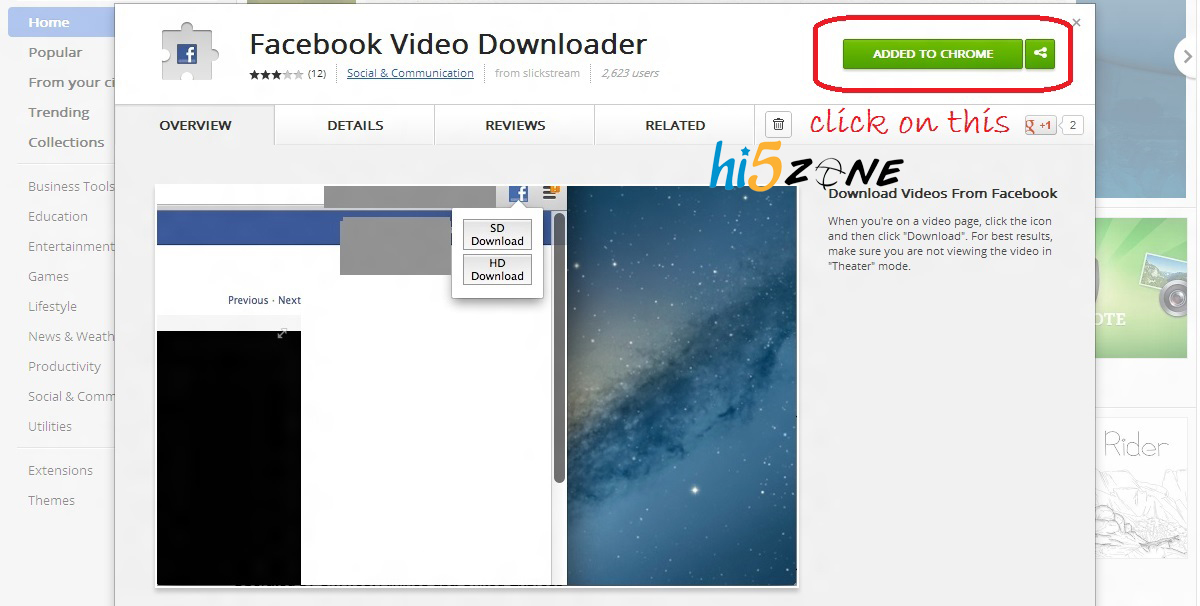 After the installation of Chrome extension, Click on any Facebook video and open it in a new tab
 Example: https://www.facebook.com/photo.php?v=421168804621097
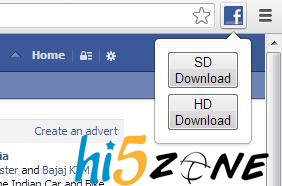
Then you will see Facebook icon your chrome tool bar Click on it.
[Click on SD Download/ HD Download]
click SAVE AS
Then you will see Facebook icon your chrome tool bar Click on it.
[Click on SD Download/ HD Download]
click SAVE AS
It will start downloading...
like us on FACEBOOK
Add a Dislike button on Facebook.
 We all have thought of having a dislike button on Facebook. But till now Facebook haven't added it.
But don’t feel bad!!!
I'm here to help you guys add a 'Dislike' button on Facebook.
Just follow the given steps carefully...
Just follow the given steps carefully...

Step 1: Go to Status Magic. It's a Facebook app that is going to help you add your Dislike button.
https://apps.facebook.com/statusmagic/
Step 2: Now just type in your desired status in the ‘Update your status’ box and in the ‘Action button’ type Dislike.
And click on ‘share’ button.


In the Action Button instead of Dislike you can also add actions like 'Love', 'Cool', 'Hate', 'Awesome' or even 'WTF' and 'LoL'.
This trick is sure to amaze your friends!!!
Like us at FACEBOOK
Increase BROADBAND Speed
Hello friends,
Today i cam in front of you with common and simple topic.
when i brows the STW group in FB,
One of my friend asked me "how to increase the speed of BROADBAND?"

You just fallow the bellow steps.
Make sure your logged on as actually "Administrator".
Start->Run->type gpedit.msc
Make sure your logged on as actually "Administrator".
Start->Run->type gpedit.msc


Expand the "Administrative Templates" branch.

Expand the "Network Branch".
Highlight the "QoS Packet Scheduler" in left window.

In right window double-click the "Limit Reservable Bandwidth" setting.

On setting tab check the "Enabled" item.
Where it says "Bandwidth limit%" change it to read 0.

Effect is immediate on some systems, some need to re-boot. This is more of a "counter what XP does" thing. In other words, programs can request up to 20% of the bandwidth be reserved for them, even with QoS disabled
You done it :)
like us at FACEBOOK
Know Your Pending Requests in Your Facebook Account
Hello friends,
Today I’m back with interesting news.
Many of my friends are asking me how to know the pending requests in FACEBOOK.
So came to you on this topic.
Pending friend requests on Facebook are actually those requests which are not confirmed yet.
Yes we could see pending friend requests in “Edit Friends” in the “Settings“. But now it is unavailable. This is why we need to find alternative way to get view all unconfirmed or pending friend requests together.
There are a few alternative ways to view the all pending friend requests together in list. Out of them, I found the easiest way to use a Facebook app called “FriendRequests“. The location of this app is at apps.facebook.com/friendrequests . Once you allow this app to work with your profile, you can see all the friend requests you made before and forward those were not confirmed. See the screenshot of it on my account.
You just fallow the bellow steps to know the Pending friend requests in your Facebook account.
Click on GO TO APP

Click to ALLOW

To load your past pending friend requests, click the BULK LOAD button above, and follow the instructions

| A small window will popup (it may take 5-10 seconds to load) Click the text in the popup and type Ctrl-A (Command-A) to select all the text Type Ctrl-C (Command-C) to Copy the text to the clipboard Click inside this box and type Ctrl-V (Command-V) to Paste the text into this box Click the Load Friend Requests button  Now you can view your friend requests in your Facebook account.  If you want to cancel the request just click on their names just DO the fallowing thing  like us at FACEBOOK | ||
Have a Lot of Face Book Albums Download It as a Single File

Need to download all the photos from your friend's Face book album? Don't Worry!
You need not to download all the pictures one by one, you can download it as a single zip file..
It’s Easy & Free!
Just follow the steps below.
Download all photos from a Face book album in a single zip
Just follow the steps below.
*. Go to Facebook2zip.com
You need not to download all the pictures one by one, you can download it as a single zip file..
It’s Easy & Free!
Just follow the steps below.
Download all photos from a Face book album in a single zip
Just follow the steps below.
*. Go to Facebook2zip.com


*. Click on Go to apothem you will be navigated to another page.

*. Type your Friend’s name here and click next

*. Here you will find all the albums in your friend's profile loaded there, select the album you need to download.

*. Click download.
That's it you have done. Now go to download folder and you will see the album zip file there.
ENJOY!!!
connect us in facebook
NICE DISK: Coffee Table of Giant 3.5" Floppy Disk

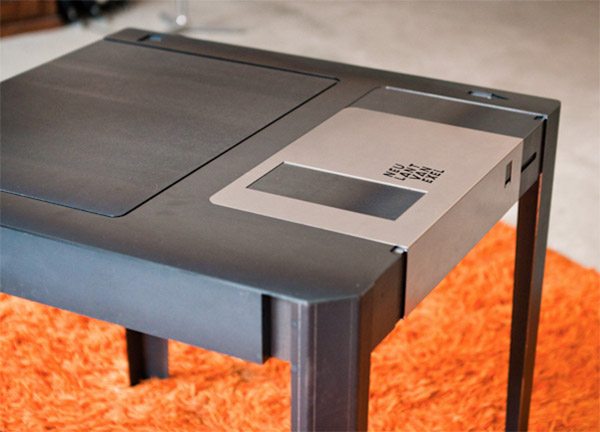
This is the floppy table a coffee table that looks like a giant 3.5" floppy disk. The metal protector even slides to the side to reveal a little storage space for your remotes/weed. That's pretty cool.
My roommate? He's the opposite of cool. Isn't that right, Derrek? He loves it when I talk about him online even if it's derogatory because it helps validate his otherwise meaningless existence. *rereading* Was that too mean? I'm joking, I don't even have a roommate. "But I'm right here." SHUT UP AND STAY IN YOUR ROOM.

Hit the jump for a shot of the remote/weed compartment.
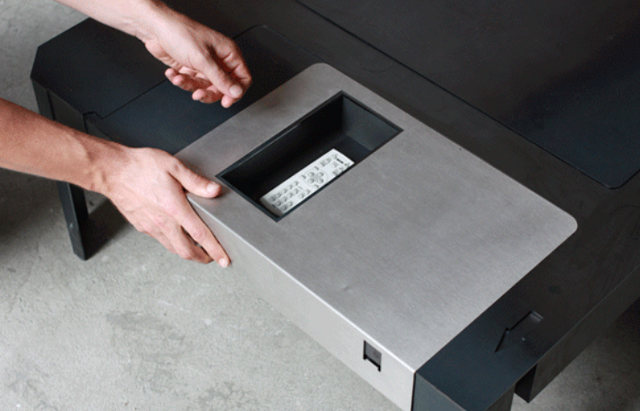

Thanks to who agree a 5 ¼" floppy coffee table that's actually floppy and bends when you put your feet on it would be even cooler.
Source : Geekologie
16 Best Free Download Managers
If you regularly download files from internet you need a best download manager which can fasten downloading speeds and also give you option to resume the download so that you can download the files later in case of interruption in internet connection. I mostly use Internet Download Manager (IDM) but it is not available for free. So I’ve collected some free download managers that you can use to download files from internet.
1.Internet Download Manager
(IDM) is a tool to increase download speeds by up to 5 times, resume and schedule downloads. Comprehensive error recovery and resume capability will restart broken or interrupted downloads due to lost connections, network problems, computer shutdowns, or unexpected power outages. Unlike other download managers and accelerators Internet Download Manager segments downloaded files dynamically during download process and reuses available connections without additional connect and login stages to achieve best acceleration performance.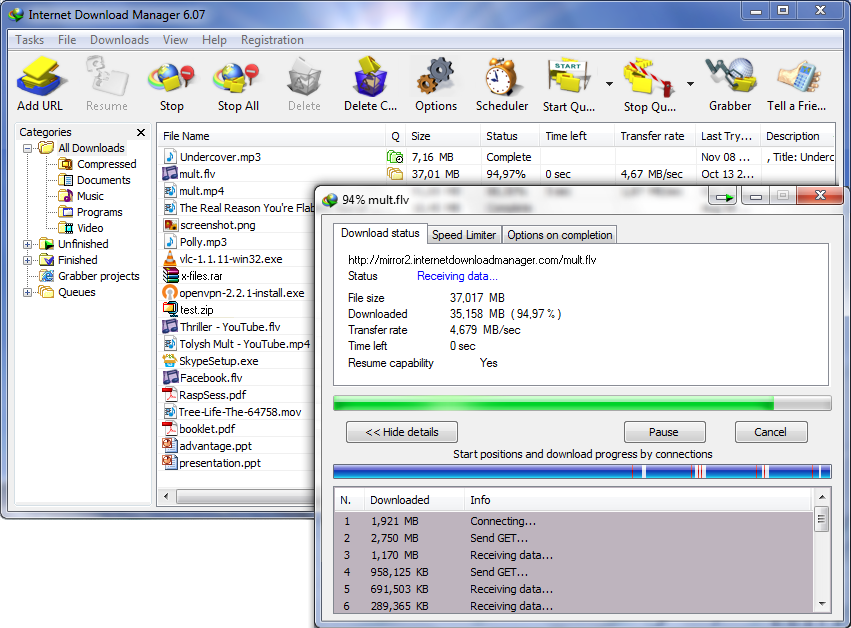
2.FlashGet

FlashGet is a leading download manager and has the highest amount of users on the internet. It uses MHT(Multi-server Hyper-threading Transportation) technique, supports various protocols and has excellent document management features. FlashGet is a freeware without any adware or spyware.
3.Orbit Downloader

Orbit Downloader, leader of download manager revolution, is devoted to new generation web (web2.0) downloading, such as video/music/streaming media from Myspace, YouTube, Imeem, Pandora, Rapidshare, support RTMP. And to make general downloading easier and faster.
4.VDownloader
VDownloader is a powerful tool that can search, download and convert videos from Youtube, Google Video, Metacafe, MySpace, DailyMotion, Pornotube, Yuvutu, and many other similar sites, saving them in AVI or MPG format. It is also a powerful video converter.
5.GetGo Download Manager

GetGo Download Manager is a FREEWARE Download Manager and Accelerator. It is easy-to-use, fast, powerful, and completely FREE. It is designed for new generation of web (2.0), GetGo can easily download video/music/file from YouTube, Myspace, Google Video, MetaCafe, DailyMotion, iFilm/Spike and any websites with embedded FLV flash videos.
6.Download Accelerator Plus (DAP)
Download Accelerator Plus (DAP) is the worlds most popular download accelerator, giving you the fastest possible download speeds, with privacy, security, and ease of use.
7.Free Download Manager

Free Download Manager is a powerful, easy-to-use and absolutely free download accelerator and manager. Moreover, FDM is 100% safe, open-source software distributed under GPL license. FDM accelerates downloads by splitting files into sections and then downloading them simultaneously. As a result download speed increases up to 600%, or even more! FDM can also resume broken downloads so you needn`t start downloading from the beginning after casual interruption.
8.Download Accelerator Manager (DAM)

Download social video and music, accelerate, schedule, resume, recover, and manage Internet downloads. Download Accelerator Manager (DAM), an easy to use, micro-sized tool, is made for the Internet file and social media downloading, such as video, music, and more downloading, from rich media sites with all browsers. DAM makes downloads easier and faster.
9.IE7Pro
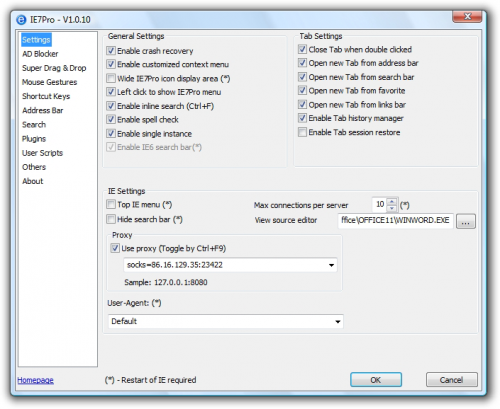
IE7Pro is a must have add-on for Internet Explorer, which includes a lot of features and tweaks to make your IE friendlier, more useful, secure and custmizable.
10.JDownloader

JDownloader is a free download manager specially designed for free file hosts like Rapidshare, Mediafire, Megaupload etc. It requires Java Runtime Enviroment (jre/jdk) 1.5 or higher.
11.Getleft
It is supposed to download complete Web sites. You give it an URL, and down it goes on, happily downloading every linked URL in that site. While it goes, it changes the original pages, all the links get changed to relative links, so that you can surf the site in your hard disk without those pesky absolute links. Limited Ftp support, it will download the files but not recursively.
12.DLExpert
DLExpert is a multi-thread resuming downloading software. It makes full use of the resources of the client and the server to download files from Internet at the fastest rate available. DLExpert’s powerful multi-thread function makes it download different parts of the same file simultaneously. Namely it can divide the file into parts. Each part will be downloaded by one thread, so different parts can be downloaded simultaneously. DLExpert supports HTTP and FTP, also HTTP and FTP proxy. Its function of auto-dial, auto-hang up, schedule downloading and auto-shutdown make it convenient and quick to download files.
13.Aktiv Download Manager
Aktiv Download Manager is a most needed tool for those looking impatiently for the next download. The application is developed to manage downloads, pause and resume downloads, queue downloads, or search for downloads.
14.LeechGet

LeechGet is a download manager that uses a very nice, modern, Microsoft Outlook-like user interface and seamlessly integrates into Internet Explorer, allowing you to easily start and manage your downloads. LeechGet provides many features, such a automatic downloading, resume of broken downloads, a download timer, automatic hang-up and shutdown and more. A built-in web parser lets you download complete website with all images and scripts in no time.
15.TrueDownloader

TrueDownloader is a open source download manager/accelerator with good features like Pause/Resume downloads, simultaneous downloads, segmented downloads for acceleration . Both HTTP and FTP protocols are supported , and it’s very fast ! You can even improve it or adapt it to your needs since it’s open-source. Some special features like HTTP/FTP Proxy support and ZIP previewing are supported too.
16.KooLoader
KooLoader is an all-in-one download manager software that guarantees a worthy Internet downloading experience through the addition of an adaptive download accelerator, segmented downloads for acceleration, an astounding number of simultaneous downloads and more. Anytime you need to download something online, copying the URL of that file will prompt KooLoader to automatically paste it into its main window and simply hitting OK in the small window that will be displayed instantly, will start the download.
Subscribe to:
Posts (Atom)