Go back to win7 from the windows. Old folder.
It is probably easiest for you to restore from windows.old
You need a boot disc you can see what you are doing.
Plenty of linux live cd's out there.
Here are screenshots from when I did it. I used my winpe disc with explorer included ( that's why you can see the aero transparency ).
If you have secure boot enabled - you will need to disable it in Bios setup.
From your boot disc - this is what your Windows 8 drive looks like:

This is what the windows.old folder contains:


Look in windows 8 drive Users\yourusername and copy the files I highlighted below into Windows.old Users\yourusername

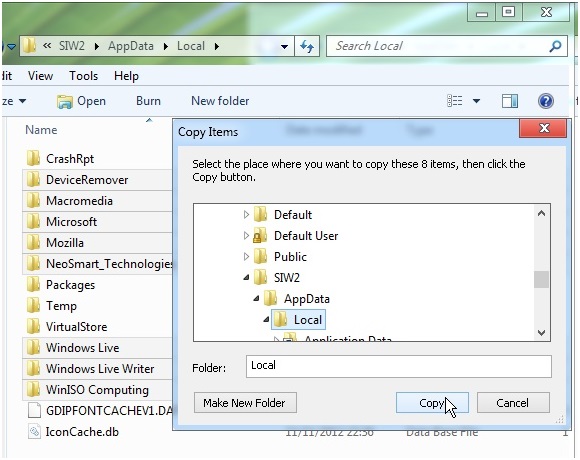
Do the same for Appdata\Roaming


MOVE ALL the highlighted folders into WINDOWS.EIGHT.

MOVE ALL the folders from Windows.old onto the root of the drive
You now have this and can reboot into windows 7.

You may also need to re enable services - your A/V for example- Windows 8 upgrade process will have disabled a few things.
Useful way to do that is to open msconfig>services tab>hide all MS services >enable all.
Downgrade From Win7 To XP
With the Windows 7 Release Candidate expiration date is just a few days away, many of Windows 7 RC users are asking a way to downgrade to Windows XP/Vista. In this guide, we will show you how to downgrade from Windows 7 to XP.

And if you want to downgrade to Vista from Windows 7, please refer our how to downgrade from Windows 7 to Vista article.
1. Open your Windows 7 drive (usually C drive) and make sure that you haven’t deleted the Windows.old folder, which was created by Windows while installing Windows 7 on XP drive. Note that without the help of Windows.old folder you won’t be able to downgrade from Windows 7.


3. Insert your Windows 7 installation disc in the drive and reboot your machine. Press any key when prompted to do so.
4. Select your language, time, keyboard type and then hit Next button to continue.


D:
Md Win7
Move Windows Win7\Windows
Move "Program Files" "Win7\Program Files"
Move Users Win7\Users
Attrib –h –s –r ProgramData
Move ProgramData Win7\ProgramData
Rd "Documents and Settings"

move /y d:\Windows.old\Windows d:\
move /y "d:\Windows.old\Program Files" d:\
move /y "d:\Windows.old\Documents and Settings" d:\

E:\boot\bootsect /nt52 d:
(Where E is your DVD driver letter & D is OS drive letter)

Attrib –h –s –r boot.ini.saved
Copy boot.ini.saved boot.ini
12. Type Exit and reboot your machine to start using your Windows XP again. You are done! If you want to free up some disk space, delete Win7 folder in the root of your XP drive.
Good luck!
FACEBOOK COULD BUY WHATSAPP
Facebook may have started talks with the company responsible for the implementation of mobile instant messaging world's most widespread, WhatsApp .

Although this information has to be taken very carefully because it could be a hoax, according tosources close have commented on TechCrunch, the social network would be studying the potential purchase , and the potential benefits in the short and long term.
In Facebook are clear that the way to reach the next billion active users is betting big on mobile platforms, where precisely WhatsApp is enthroned in the field of instant messaging, despite the recent arrival of services such as Line .
WhatsApp is one of the key points that Facebook still wants to improve their internationalization inemerging markets. The messaging application, which is currently looking for translators of various languages , has users in over one hundred countries covering 750 mobile networks through iOS, Android, Blackberry, Windows Phone or Symbian.
Confirmed the acquisition of some of the parts, besides getting the opening of new markets and millions of users, Facebook would get great benefits from every purchase directly undertake the application users.
Remember that Facebook already ventured into the world of mobile applications with the purchase of Instagram for a final price of 715 million euros .
Although so far none of the two companies have confirmed or denied these potential purchase plans, certainly that would be conducted fairly surprising because the basic principles by which Whatsapp has been so successful.
Ironically, WhatsApp explicitly repudiated advertising as a revenue source that could work in your favor when negotiating purchase. Meanwhile, all know as Facebook has risen prominently and even intrusive advertising as a way to get a significant amount of revenue.
Without going any further, Jan Koum, WhatsApp cofounder, wrote this year in a post on the company:
Advertising is not only an interruption of aesthetics, is an insult to intelligence. In every company that sells ads, an important part of their engineering team spends the day packing the user's personal data to better reach your advertising, instead of writing better code. When it comes to advertising the user is treated as a product.
And not just these words by WhatsApp which would make it a surprise this acquisition . On other occasions, has publicly Jan Koum disgust you supposed to see that startups sell quickly before the money power of the big companies.
Unable to Open Hard or USB Flash Drive with Windows
In some situation especially when anti-virusprogram has cleaned, healed, disinfected or removed a worm, trojan horse or virus from computer, there may be error happening whenever users try to open or access the drive by double clicking on the disk drive icon in Explorer or My Computer window to try to enter the drive’s folder. The problem or symptom happens in hard disk drive, portable hard disk drive or USB flash drive, and Windows will prompt a dialog box with the following message:
Windows Script Host
Cannot find script file autorun.vbs.
Sometimes you will be asked to debug the VBScript with error code of 800A041F – Unexpected ‘Next’.
or
Choose the program you want to use to open this file with:
In this case, the “Always use the selected program to open this kind of file” option is grayed out.
The symptom occurs because when autorun.vbs is created by trojan horse or virus. The virus normally loads autorun.inf file to root folder of all hard drive or USB drive, and then execute autorun.bat file which contains script to apply and merge autorun.reg into the registry, with possible change to the followingregistry key to ensure that virus is loaded when system starts:
[HKEY_LOCAL_MACHINE\SOFTWARE\Microsoft\Windows NT\CurrentVersion\Winlogon]
Userinit=userinit.exe,autorun.exe
Userinit=userinit.exe,autorun.exe
Finally, autorun.bat will call wscript.exe to run autorun.vbs.
When antivirus or security software detected the autorun.vbs file as infected, the file will be deleted or removed or quarantined. However, other files (autorun.*) and registry value still referring to autorun.vbs, and this document no longer exists, hence the error when users double click to open a drive folder.
To correct and solve this error, follow this steps:
Run Task Manager (Ctrl-Alt-Del or right click on Taskbar)
Stop wscript.exe process if available by highlighting the process name and clicking End Process.
Then terminate explorer.exe process.
In Task Manager, click on File -> New Task (Run…).
Type “cmd” (without quotes) into the Open text box and click OK.
Type the following command one by one followed by hitting Enter key:
del c:\autorun.* /f /s /q /a
del d:\autorun.* /f /s /q /a
del e:\autorun.* /f /s /q /a
del d:\autorun.* /f /s /q /a
del e:\autorun.* /f /s /q /a
c, d, e each represents drive letters on Windows system. If there are more drives or partitions available, continue to command by altering to other drive letter. Note that you must also clean the autorun filesfrom USB flash drive or portable hard disk as the external drive may also be infected.
In Task Manager, click on File -> New Task (Run…).
Type “regedit” (without quotes) into the Open text box and click OK.
Navigate to the following registry key:
HKEY_LOCAL_MACHINE\SOFTWARE\Microsoft\Windows NT\CurrentVersion\Winlogon
Check if the value name and value data for the key is correct (the value data of userint.exe include the path which may be different than C drive, which is also valid, note also the comma which is also needed):
“Userinit”=”C:\WINDOWS\system32\userinit.exe,”
If the value is incorrect, modify it to the valid value data.
Section 66A Of The Information Technology Act: A Provision Ultra Vires The Indian Constitution

The nation is understandably outraged at the way two girls in Maharashtra were arrested for expressing themselves on Facebook (I can empathize with them, for I myself am very vocal about such issues on that very social networking site), condemning the forced bandh in Mumbai after Bal Thackeray’s death (one had posted the status and the other only ‘liked’ it), and earlier, how a man was arrested for tweeting against Chidambaram’s son. While the law enforcement agencies are to blame, in this case, so is the letter of the law, and the problematic provision is Section 66A of the Information Technology (IT) Act.
In an article I wrote, I defended the sedition law, saying that reasonable restraints to the freedom of speech and expression, as laid down in Article 19(2) of the Indian constitution or Article 19(3) of the International Covenant on Civil and Political Rights (ICCPR), to which India is a signatory, are justified and democracy can’t be allowed to sound a death-knell to itself, misuse of the law, such as by detaining a cartoonist ridiculing the Parliament (he may have been ridiculing our MPs and not parliamentary democracy as such) notwithstanding.
I also support the provision in the Indian Penal Code (IPC), Section 295A to be precise, that classifies outraging religious sentiments as an offence. A civil critique of faith is different from outraging sentiments, and the anti-Islam film made in the US, for instance, in my opinion, should be banned in India, but not to say, a film like The Da Vinci Code, that doesn’t demonize Christ. This is not to say that I am not open to a critique of Ram, Krishna, Jesus or Muhammad, but it should be civil and free from ridicule or abuse, and in that spirit, I am not against Jethmalani’s remarks on Wahabi Islam a few years back or Ram more recently. Again, Section 295A of the IPC has also been misused against the girls who criticized the Mumbai bandh in addition to Section 66A of the IT Act, but how that relates to outraging religious sentiments is beyond me; yet, the possibility of misuse does not make a law redundant by itself.
So, in spite of not having fanatic views on free speech to the extent of being classified as a “liberal fundamentalist” (yes, this terminology is used!), why do I say that Section 66A of the IT Act is unconstitutional? The answer is simple – it doesn’t fall within the ambit of reasonable restrictions to the right to freedom of speech and expression mentioned in Article 19(2) of the Indian constitution. Let us have a look at Section 66A of the IT Act first. Here’s what it says –
“Punishment for sending offensive messages through communication service, etc. – Any person, who sends, by means of a computer resource or a communication device,-
(a) Any information that is grossly offensive or has menacing character; or
(b) any information which he knows to be false, but for the purpose of causing annoyance, inconvenience, danger, obstruction, insult, injury, criminal intimidation, enmity, hatred, or ill will, persistently makes by making use of such computer resource or a communication device,
(c) Any electronic mail or electronic mail message for the purpose of causing annoyance or inconvenience or to deceive or to mislead the addressee or recipient about the origin of such messages
shall be punishable with imprisonment for a term which may extend to three years and with fine.
(a) Any information that is grossly offensive or has menacing character; or
(b) any information which he knows to be false, but for the purpose of causing annoyance, inconvenience, danger, obstruction, insult, injury, criminal intimidation, enmity, hatred, or ill will, persistently makes by making use of such computer resource or a communication device,
(c) Any electronic mail or electronic mail message for the purpose of causing annoyance or inconvenience or to deceive or to mislead the addressee or recipient about the origin of such messages
shall be punishable with imprisonment for a term which may extend to three years and with fine.
Explanation: For the purposes of this section, terms ‘Electronic mail’ and ‘Electronic Mail Message’ means a message or information created or transmitted or received on a computer, computer system, computer resource or communication device including attachments in text, image, audio, video and any other electronic record, which may be transmitted with the message.”
Now, let us have a look at Article 19(2) of the Indian constitution. It allows reasonable restrictions “in the interests of the sovereignty and integrity of India, the security of the State, friendly relations with foreign States, public order, decency or morality or in relation to contempt of court, defamation or incitement to an offence”.

Next, let us evaluate Section 66A by this yardstick. Clause (a) is too vague and ambiguous. Clause (b), to a great extent, is reasonable because it mostly squarely falls within the scope of reasonable restrictions in relation to defamation. Clause (c), however, is the strangest provision that allows, in clear terms, merely “causing annoyance or inconvenience” to be a crime! Is this democratic by any means? And yes, clause (a) is also undemocratic, for the room it leaves. As for clause (b), defamation exists in India under the law of torts as also under the IPC, as defined in Section 499, and the punishment for it as a crime, as mentioned in Section 500 of the IPC, is imprisonment for up to two years, fine or both, and as for tortious defamation, the tortfeasor would have to pay compensation to the person he/she has maligned, and so, there is no reason for this to figure in the IT Act.
Worse still, for all these activities classified in this provision, the punishment straight away is imprisonment for three years, which is certainly draconian, going against the principles of fairness and reasonableness outlined in the landmark Wednesbury case in England and endorsed by the Maneka Gandhi case in India, even if by some absolutely bizarre logic, annoying or inconveniencing someone is a crime!
I am sure some human rights lawyers would file a writ petition in the Supreme Court under Article 32 of the constitution to have Section 66A of the IT Act struck down under Article 13(2) of the constitution, which states – “The State shall not make any law which takes away or abridges the rights conferred by this Part and any law made in contravention of this clause shall, to the extent of the contravention, be void.” The ‘Part’ referred to is Part III of the constitution, which contains the fundamental rights, including the right to freedom of speech and expression contained in Article 19(1)(a), and the apex court in its wisdom would take the necessary steps, even though Mr. Sibal, the IT Minister, seems to be in no mood to concede that this provision introduced by the UPA back in 2008, is blatantly unjust (for reference, please see this video, that also points to how Shiv Sainiks vandalized a clinic run by an uncle of one of the girls, which is hardly surprising, given the past record of that party).
It’s a test for Indian democracy now, and if we don’t act soon enough to protect our democratic character, then we may set in motion a historical process culminating in disastrous consequences.
Download Torrents in Android, Symbian, Java and Windows Mobile Phones [Apps]

Torrents are the most popular way to download multimedia/digital files .Though they are somewhat illegal as it violates copyrights issues to some extent but nevertheless everybody use them to get their favorites movies ,songs ,software etc and I know you are one of them . What if you are on a trip or something and want to download a torrent and you don’t have your laptop or PC with you? No worry I will give you a solution to that all you need is your mobile phone no matter if it’s has android , symbian , windows or java . Yes you guessed it right , I am going to tell you how you can download torrents in mobile phone using torrent apps for respective platform i.e android , windows, symbian and java.
Download Torrent in Android phone
Android has a wide variety of apps in their Google Play(Former Android Market) but one of the top and most popular app which I personally like to download torrent file is Transdroid. It comes up with tons of features and it allows having full control on your remote torrent client. It supports wide variety of torrent client like µTorren, Transmission, Vuze,Deluger, bitTorrent, Ktorrent Etc.


Some features of Transdroid are :
§ You can Start, stop, remove and move your torrents
§ You can set file priorities and trackers
§ Change maximum transfer rates
§ Add via barcode scanner, URL or local .torrent file
§ Alarm service notifies on added or completed torrents
§ Custom web-based search to support private sites
§ Secured (SSL) connecting
There are some other Apps you can use to download torrents in Android phone. Below is the list of some such apps. :
§ Swarm
nloTorrent in Symbian Phone
Symbian is the most popular OS used by Nokia. If you are symbian user and want to download torrents in your symbian phone then the best app for you is SymTorrent. It works on all Nokia s60 Series phone. It’s free to download with GPL licensed Open source i.e it has it’s source code available to everyone.

Download SymTorrent
WizBit is another torrent client you can use to download torrent in Nokia S60 symbian phones. It’s free too.
Windows phone are one of the most popular smart phones available and widely used all over the world. If you are one of those who own windows phone and want to try downloading torrent on your phone then you can try an app called wmTorrent. It’s one of the old torrent client available for windows phone.
Some of the features are :
§ Direct save to file, no more temporary file
§ Full and consolidated file saving modes
§ Trackerless Torrents (DHT) based on Kademlia
§ Peer Exchange (PEX)
§ Plain Text and RC4 Protocol Encryptions
§ Advanced extensions
§ Windows Mobile Standard, Classic and Professional


Download Torrent in Java Phone
Java (Java ME) is one of the oldest Mobile OS, They are found in old and basic phone with less functionalities, Still there are lot user who still own Java phone . To download torrent in your Java Phone you can useMobTorrent .It is the first Bit torrent client for Java ME phones works best for Nokia S40 Series.

The demerit of this application is that it has memory limit, which limits download to reasonable small torrent files.

Download MobTorrent
Hope you will enjoy your torrent download on your favourite smart phone. Stay tuned for more tips and tricks .Do not forgets to express your views through comments.
B.Tech 4-1 Regular/Supple Exam Results (Nov 2012).Alternative way to check ur results
IV B.Tech. I Semester (R09)Results - November, 2012
Code:
OR
OR
OR
OR

1) Replace "HI5ZONE" with ur hall ticket no in each link given under particular year/semester
2) Copy & paste the each url given under year/semester results in ur browser & hit enter to get the results.Ex: jntuh.ac.in/results/htno/09r11A0520/189111
3) It make take 2 to 3 mins to get the results.if u get any error during this process go to the end of the page to check the results (sometimes if u get any error still the results will be displayed at the end of the page). Enjoy the way to get faster results.Check Sample Screenshot here
IV B.Tech I Semester (R09) Results Nov 2012: jntuh.ac.in/results/htno/HI5ZONE/1059
IV B.Tech I Semester (R07) Results Nov 2012: jntuh.ac.in/results/htno/HI5ZONE/1060
IV B.Tech I Semester (R05) Results Nov 2012: jntuh.ac.in/results/htno/HI5ZONE/405
IV B.Tech I Semester (RR) Results Nov 2012: jntuh.ac.in/results/htno/HI5ZONE/406
2) Copy & paste the each url given under year/semester results in ur browser & hit enter to get the results.Ex: jntuh.ac.in/results/htno/09r11A0520/189111
3) It make take 2 to 3 mins to get the results.if u get any error during this process go to the end of the page to check the results (sometimes if u get any error still the results will be displayed at the end of the page). Enjoy the way to get faster results.Check Sample Screenshot here
IV B.Tech I Semester (R09) Results Nov 2012: jntuh.ac.in/results/htno/HI5ZONE/1059
IV B.Tech I Semester (R07) Results Nov 2012: jntuh.ac.in/results/htno/HI5ZONE/1060
IV B.Tech I Semester (R05) Results Nov 2012: jntuh.ac.in/results/htno/HI5ZONE/405
IV B.Tech I Semester (RR) Results Nov 2012: jntuh.ac.in/results/htno/HI5ZONE/406
Subscribe to:
Posts (Atom)