Windows 8 Keyboard Shortcuts
Windows 8 Keyboard Shortcuts will help you to get the work done faster on Windows 8, but also help you to save time and effort. Keyboard shortcuts are always handy to use and help you to stop mousing around and become a keyboard maestro.
 Today we provide you the list of Windows 8 Keyboard Shortcuts to help you become a Windows 8 keyboard ninja. These Windows 8 keyboard shortcuts will help you to save your time using Windows 8 and the Metro Start Screen a lot easier and more productive.
Windows 8 Keyboard Shortcuts
Here is the list of Windows 8 Keyboard Shortcuts
Windows logo key+Y – Temporarily look at the desktop
Windows logo key+Enter – Launches Narrator
Windows logo key+F – File Search
Windows logo key+I – Settings
Windows logo key+K – Connections
Windows logo key+H – Share
Windows logo key+Q – Search
Windows logo key+W – Settings search
Windows logo key+Z – Flip open apps
Windows logo key+C – Toggle control
Windows logo key+D – Open Desktop
Windows logo key+, – Peek at desktop
Windows logo key+B – Back to desktop
Windows logo key+. – Snap app to the left
Windows logo key+Shift+. – Snap app to the right
Alt+F4 – Close an app
Windows logo key+X – Open system utility settings menu
Windows logo key+PrntScrn – Take screenshot and save to Pictures
Windows logo key+Tab - Open switch list
Windows logo key+T – Preview open windows in taskbar
Windows logo key+U – Open Ease of Access Center
Windows logo key+Spacebar – Switch language and keyboard
Hope you like the article about Windows 8 Keyboard Shortcuts, if you find any more helpful ones, let us know in the comments below. You can download the Windows 8 Consumer Preview from here.
Windows 8 Keyboard Shortcuts
Here is the list of Windows 8 Keyboard Shortcuts
Windows logo key+Y – Temporarily look at the desktop
Windows logo key+Enter – Launches Narrator
Windows logo key+F – File Search
Windows logo key+I – Settings
Windows logo key+K – Connections
Windows logo key+H – Share
Windows logo key+Q – Search
Windows logo key+W – Settings search
Windows logo key+Z – Flip open apps
Windows logo key+C – Toggle control
Windows logo key+D – Open Desktop
Windows logo key+, – Peek at desktop
Windows logo key+B – Back to desktop
Windows logo key+. – Snap app to the left
Windows logo key+Shift+. – Snap app to the right
Alt+F4 – Close an app
Windows logo key+X – Open system utility settings menu
Windows logo key+PrntScrn – Take screenshot and save to Pictures
Windows logo key+Tab - Open switch list
Windows logo key+T – Preview open windows in taskbar
Windows logo key+U – Open Ease of Access Center
Windows logo key+Spacebar – Switch language and keyboard
Hope you like the article about Windows 8 Keyboard Shortcuts, if you find any more helpful ones, let us know in the comments below. You can download the Windows 8 Consumer Preview from here.
It’s about hard disks work
If you are to dismantle the hard disk drive by opening the top casing (after removing all
the necessary screws), the first thing you'll see is a spindle holding one or a number of mirror-like hard rotating platters (commonly called data platter). The platters could be made to spin at an extremely high speed, technically between 5,400 to 10,000 revolutions per minute (RPM). An extremely thin
magnetic coating is layered onto the surface of the platter that is polished to mirror-type smoothness.
The platter is usually made of glass or ceramic
(modern platter may use titanium). Unlike a floppy disk, the platter cannot be bent or flipped and hence we coin it as "hard disk" or "hard drive". Commonly a hard disk contains 1 to 10 identical platters that are stacked in parallel to form a cylinder. There is usually one Read Write (RW) head designated per platter face, and each head is attached to a single actuator shaft which moves all heads in unison and performs a uniform synchronous motion during reading or writing of data.
Data on a hard disk is stored in microscopic areas called magnetic domains on the magnetic material. Each domain stores either a 1 or 0 value. Similar to a floppy disk, a hard disk records its data in concentric circles or tracks, which are numbered from the outermost edge to the innermost edge of the platter. These tracks are further subdivided into smaller units called sectors which typically store 512 bytes of data each. Zoning may be needed to further optimist the data storage as the outer circumference would normally pack more sector units than the inner circumference.
The RW head is the key component that performs the reading and writing functions. It is placed on a slider which is in term connected to an actuator arm which allow the RW head to access various parts of the platter during data IO functions by sliding across the spinning platter.
The sliding motion is derived by passing a current through the coil which is part of the actuator-assembly. As the coil is placed between two magnets, the forward or backward sliding motion is hence derived by simple current reversal. This location of the platter (just like the landmark along the road) is identified and made possible by the embedded servo code written on the platter.
It is therefore easy to understand that if the RW head happens to "knock" on the spinning platter out of design specification, a Read Write head crash occurs.
When the computer is switched off, the head is usually pulled to a safe parking zone to prevent the head from scratching against the data zone on platter when the air bearing subsides. This process is called a parking and different techniques have been implemented in various hard disks to handle the take offs and landings. In a Ramp load/unload design, a lifting mechanism parks the head outside of the platter onto a "parking bay" prior to a shutdown. It then automatically unpacks and relocates itself above the disk platter when the platter spins up to appropriate rotational speed.

There're two popular ways to measure the performance of a hard disk:
Data Rate
Data rate is also known as data transfer rate or throughput. It refers to the speed with which the data can be transmitted from one device to another. Data rates are commonly measured in megabytes (MB) per second. The data rates for a typically hard disk ranges between 5 to 40 megabytes per second.
Seek Rate
Seek time refers to the total span of time between a file request by the CPU to the point when the first byte of the file is sent to the CPU. This is one of the several delays associated with reading or writing data on a computer's disk drive. In order to read or write data in a particular place on the disk, the read/write head needs to man-oeuvre to the precise location of the disk platter. This process is known as "seeking", and the time it takes for the head to move to the right place is referred to the "seek time". A typical seek time for a hard disk is about 9 to 15.
S.M.A.R.T
Majority of all hard disk today support a technology known as S.M.A.R.T. (Self-Monitoring, Analysis, and Reporting Technology) which helps to predict imminent disk failures so that users can be alerted to take preventive actions before the disk fails completely.
 Internal of a hard disk drive |
magnetic coating is layered onto the surface of the platter that is polished to mirror-type smoothness.
The platter is usually made of glass or ceramic
(modern platter may use titanium). Unlike a floppy disk, the platter cannot be bent or flipped and hence we coin it as "hard disk" or "hard drive". Commonly a hard disk contains 1 to 10 identical platters that are stacked in parallel to form a cylinder. There is usually one Read Write (RW) head designated per platter face, and each head is attached to a single actuator shaft which moves all heads in unison and performs a uniform synchronous motion during reading or writing of data.
Data on a hard disk is stored in microscopic areas called magnetic domains on the magnetic material. Each domain stores either a 1 or 0 value. Similar to a floppy disk, a hard disk records its data in concentric circles or tracks, which are numbered from the outermost edge to the innermost edge of the platter. These tracks are further subdivided into smaller units called sectors which typically store 512 bytes of data each. Zoning may be needed to further optimist the data storage as the outer circumference would normally pack more sector units than the inner circumference.
 Read Write Head
The RW head is the key component that performs the reading and writing functions. It is placed on a slider which is in term connected to an actuator arm which allow the RW head to access various parts of the platter during data IO functions by sliding across the spinning platter.
The sliding motion is derived by passing a current through the coil which is part of the actuator-assembly. As the coil is placed between two magnets, the forward or backward sliding motion is hence derived by simple current reversal. This location of the platter (just like the landmark along the road) is identified and made possible by the embedded servo code written on the platter.
Flying Height
To write a piece of information to the disk, an electromagnetic flux is transmitted through the head which hovers very closely to the platter. The RW head suspends on a thin cushion of air which the spinning platter induces. This designed distance between the head and platter is called the flying height. It can literally measure to a few millionths of an inch. A good analogy is to try to imagine flying a Boeing 747 with about 6 inches above ground level.It is therefore easy to understand that if the RW head happens to "knock" on the spinning platter out of design specification, a Read Write head crash occurs.
Read Write Function of Disk
As the head writes data onto the disk, it changes its magnetic polarization to induce either a one or zero value. During a read request, data is interpreted when the magnetic fields on the platter brings about an electrical change (as a result of change in electrical resistance of some special material property) in the read-head that passes over it. These electrical fields are then encoded and transmitted to the CPU to be processed and read by the system.Parking of RW Head
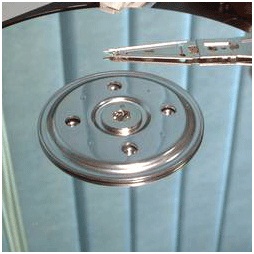 The read/write head will move to the parking zone when the computer is switched off. |
Hard Disk Controller PCB Board
A hard disk also contains a pcb controller circuit board that regulates data traffic. It ensures massive data to be streamed in and out of the disk smoothly. A logic board that sits under the drive controls and connects the spindle, head actuator, and various disk functions of the disk. Embedded with a micro-controller, it executes self-diagnostics test and cleans up data working area in the memory and all internal chip bus in the hard drive when it powers up.Hard Disk Parts Overview
Today's Disk and Data
Storage capacity is measured in terms of GB (Gigabyte). 1 GB roughly equals to 1000 MB (Megabyte). A typical desktop machine purchased today carries a hard disk of at least 80 to 400 gigabyte. Computer data is stored onto the disk logically in the form of files or simply, a string of bytes. When a program requests for a file, the hard disk retrieves its bytes and sends them to the CPU to be processed.There're two popular ways to measure the performance of a hard disk:
Data Rate
Data rate is also known as data transfer rate or throughput. It refers to the speed with which the data can be transmitted from one device to another. Data rates are commonly measured in megabytes (MB) per second. The data rates for a typically hard disk ranges between 5 to 40 megabytes per second.
Seek Rate
Seek time refers to the total span of time between a file request by the CPU to the point when the first byte of the file is sent to the CPU. This is one of the several delays associated with reading or writing data on a computer's disk drive. In order to read or write data in a particular place on the disk, the read/write head needs to man-oeuvre to the precise location of the disk platter. This process is known as "seeking", and the time it takes for the head to move to the right place is referred to the "seek time". A typical seek time for a hard disk is about 9 to 15.
S.M.A.R.T
Majority of all hard disk today support a technology known as S.M.A.R.T. (Self-Monitoring, Analysis, and Reporting Technology) which helps to predict imminent disk failures so that users can be alerted to take preventive actions before the disk fails completely.
Things I hate about Android
 Android is the new rocker in Mobile operation system, which has taken the mobile world by storm. But is the system really worth? It all started when Google was looking out for a mobile operating system and a small start up company called “Android” had what they wanted. Google announced its entry in a bang to the world
Android system is open source which runs on Linux Kernel and uses Java based runtime for apps and interface. Android is a clone of iPhone with a rip of all the features. The amount of patent violation caused by this product is worth mentioning.
This is a weird situation as Google has washed its hands off and most of the handset manufacturers are paying the price for this careless approach by paying royalties on per device sold basis to the companies claiming the patents. This is making the handsets cost more and the advantage of Android dies here.
Any user buying an Android phone needs a high tech research to find out which of the phones are superior or which phone has X feature and hardware configuration else there is a high chance that one will end up buying a phone with an outdated OS and the UI or the hardware which is too slow to handle the system. Another issue is the number of versions of Android which is available in the market. Check the market share of the Android OS in the market. Number of the OS versions active in market is simply alarming.
Android Market has more than 300,000 apps. This is quite impressive. But in reality how much of these Apps is worthy. Since Google does not regulate the apps on the market place, some of the apps with malicious code and intent have already sneaked into Android. There are many security issues on the platform but Google has not shown much intent to patch these.
Most of the Android users spoke
- I brought a Android Device because
- It’s Cheap.
- This phone has large screen and the screen resolution is good.
- This phone’s form factor is small and handy.
It’s very rare that come across someone answering that “I brought because Android has X feature”. But I guess this is the real success factor for Android. There N number of devices to choose from.
But despite all these loopholes, Android has kept its foot firmly to rule the world for coming years.
Disadvantages
- it force closes apps if they are too large
- it over heats easily during summer
swype feauture does not work on most texting apps and is not given on the messaging tool your phone is set with.
the phone itself has very little memory storage, so you have to keep large apps, videos, and photos on a card.
Other than that, andriod phones are AMAZING! ABH!
Some of the genuine drawbacks of Android are:-
1)Fragmentation:-It means that you have different phones running different versions of Android..Example:- Android 2.3(Gingerbread), took about six months to reach most phones from the time it was first released due to the fragmented nature of Android.2)Decentralized:-It lacks central Android body to address the grievance of its users.
3)Very unstable and often hangs or crash
4)Battery Drainage and overheating:-Overheating of Android device has been a big issue and it has a very short battery life.
5)Continuous Internet connection:-Most Android phones require a simultaneous Internet connection
Android malware
Android malware is growing at an exponential rate, but until a large and significant user base is affected by malware we won't see any major changes in user behavior, every smartphone customer can relate to: Most consumers don't care until they get their first $1,000 phone bill because their pirated Angry Birds has been calling Estonia all month.• Android malware has jumped 472 percent in the four months since July 2011.
Despite this astounding uptick in harmful, corrupt software, Android has captured 52.5 percent of the global smartphone market share, according to technology research firm Gartner, with more than 440.5 million units sold in the third quarter (July through September) alone.
So Android malware is clearly a problem. But, like car theft, it's not a real problem until yours is the one that's stolen.
The rise in malware will only become a real issue, he said, when a customer "gets a $300 phone bill from premium-rate SMS messages or their identity gets stolen.
• Android smartphones offer a wide range of hardware, prices and user experiences, which make them popular with a number of users, but this also hurts the platform in a few key areas. For background I’ve used almost every Android phone available on Verizon and currently own the Galaxy Nexus.
Android Apps
Android apps rarely measure up to their iPhone counterparts. When some Android apps do compete with the iPhone versions, they’re often launched months after the iOS original.
Sadly, even when apps arrive on Android there’s a catch or a gotcha. When Temple Run for Android arrived it didn’t bring support for the Droid Bionic and the Droid RAZR, something that has been fixed, but not for all phones. Thankfully I can play it on my Galaxy Nexus, but with Android apps you can never be sure.
Take Hulu Plus for example. Hulu Plus just released support for seven Android tablets. About time Hulu. But, back to Android phones. the Galaxy Nexus, a flagship Android phone with a beautiful screen begging to be used to watch The Daily Show, but Hulu still doesn’t officially support my phone. Hulu offered an app that worked on the Galaxy Nexus when it launched, but pulled it because someone isn’t paying them enough money.
the user interface and quality is rarely as good as on the iPhone. There are tons of Twitter clients for Android, but there none of them stand out in the way that Tweetbot does.
When it comes down to it, I buy and try more duds on Android than I do on the iPhone, which may be why so many Android users are fans of free apps instead of paid ones.
ANDROID CAMERAS
I hope you like the look of disappointment on your face. That’s what you’ll get if you take your photo with most Android phone cameras.
Motorola’s line of cameras are dissapointing, and even the fast shutter speed of the Galaxy Nexus is ruined by the time it takes to launch the camera app and the resulting image quality.
There’s hope in the HTC One X and One Series, but the current crop of Android phones have trouble hanging with the iPhone when it comes to capturing life
Video Playback
If you’ve ever tried to play an embedded video on an Android device you know this frustration. First you need to hit the video in the right spot to start playing, then you need to zoom just right or tap just right sop that it is almost full screen. Good luck pausing the video.
On the iPhone, when you want to watch a video embedded in a post it goes full screen and plays with a standard set of controls that make it easy to pause and change volume.
Android can’t offer a similar functionality, or at least the option to make this happen.
Lack of Accessories
Android phones aren’t devoid of accessories, but there is nowhere near as many as are available for the iPhone.
Honestly I just want a car dock with line out for my Android phone, but many users would appreciate a better selection of cases for Android phones.
Even when we see cool Android phone accessories, like the Galaxy Nexus car dock with 3-pin support, it never arrives for sale in the U.S.
Why don’t we have more Android accessories? Android phones come in all shapes and sizes, so it is costly to support a phone with custom fitting cases.
Couple that with the fact that a new phone comes out every few weeks instead of every year, including some that are immediately overshadowed by a new phone from the same company, and you have significant barriers to making great Android accessories.
Slow Updates and Bug Fixes
Google releases a new version of Android every year, about as often as Apple. But, Apple devices are more likely to get a current version of iOS at a speedy pace than Android devices.
We’re still waiting for news on when most Android phones will get Android 4.0 and learning every week that more phones won’t get access to Ice Cream Sandwich.
Even bug fixes, which phones need fast, can take forever. Droid Bionic owners waited months for a bug fix. Galaxy nexus owners are still waiting for a bug fix and minor update.
Carriers are partially to blame for these slow updates, but Google and manufacturers can’t keep pushing the blame. Android users shouldn’t have to turn to third parties for leaked updates and fixes.
While most of iPhone complaints are tied to software, Android issues are a mix of hardware and software problems. Hopefully Google can fix these software issues and provide hardware guidance to Android manufacturers, specifically about how to make better cameras.
Android Linux-based system, so as to modify Android, the user must know the commands on the Linux system, and should log on as administrator. Not only is the installation of Program, each phone has a different way. The lack of compatibility all users of Android phones, we must learn again if Android phones to replace with other brands. Even to show any recovery mode, an Android phone has a different way. So in conclusion, if you are a person who likes to tinker with the phone, then you should not use mobile phones for Android.
by
Emani Sowjanya
GCTC,IT
Computer keyboard shortcut keys----VERSION2
 As we have posted the few shortcuts earlier and we have received a very huge response so we upgraded to some more information as follows.

Here few other list of short cuts along with some tips....
With functional keys
F1 Help
F2 Edit
F3 Paste Name
F4 Repeat last action
F5 Go to
F6 Next Pane
F7 Spell check
F8 Extend mode
F9 Recalculate all workbooks
F10 Activate Menu bar
F11 New Chart
Magic with shift
- SHIFT: Press and hold down the SHIFT key while you insert a CD-ROM to bypass the automatic-run feature
- Shift+F1 HELP
- Shift+F2 Insert, Edit Comments
- Shift+F3 change the text from upper to lower and vice ver·sa
- Shift+F4 move to the top of the pages
- Shift+F5 Find
- Shift+F6 previous pane
- Shift+F7 Display Properties
- Shift+F8 Add to worksheet(excel)
- Shift+F9 calculate active worksheet(excel)
- Shift+F10 Display Short cut Menu
- Shift+F11 New Worksheet
- Shift+F12 Save

Now comes ctrl
Ctrl+A Select All
Ctrl+B Bold
Ctrl+C Copy
Ctrl+D Fill Down
Ctrl+F Find
Ctrl+G Goto
Ctrl+H Replace
Ctrl+I Italic
Ctrl+K Insert Hyperlink
Ctrl+N New Workbook
Ctrl+O Open
Ctrl+P Print
Ctrl+R Fill Right
Ctrl+S Save
Ctrl+U Underline
Ctrl+V Paste
Ctrl W Close
Ctrl+X Cut
Ctrl+Y Repeat
Ctrl+Z Undo
General folder/shortcut control
- F4: Selects the Go To A Different Folder box and moves down the entries in the box (if the toolbar is active in Windows Explorer)
- F6: Moves among panes in Windows Explorer
- F5: Refreshes the current window.
- CTRL+G: Opens the Go To Folder tool (in Windows 95 Windows Explorer only)
- CTRL+Z: Undo the last command
- CTRL+A: Select all the items in the current window
- BACKSPACE: Switch to the parent folder
- SHIFT+click+Close button: For folders, close the current folder plus all parent folders
Accessibility shortcuts
- Press SHIFT five times: Toggles Sticky-keys on and off
- Press down and hold the right SHIFT key for eight seconds: Toggles Filter-keys on and off
- Press down and hold the NUM LOCK key for five seconds: Toggles ToggleKeys on and off
- Left ALT+left SHIFT+NUM LOCK: Toggles MouseKeys on and off
- Left ALT+left SHIFT+PRINT SCREEN: Toggles high contrast on and off
by
KESHAV
IT(gcet)
IT(gcet)
Blue Teeth became Bluetooth
Looking after your Teeth

By the way if, you're wondering where the Bluetooth name originally came from, it named after a Danish Viking and King, Harald Blåtand (translated as Bluetooth in English), who lived in the latter part of the 10th century. Harald Blåtand united and controlled Denmark and Norway (hence the inspiration on the name: uniting devices through Bluetooth).
He got his name from his very dark hair which was unusual for Vikings, Blåtand means dark complexion. However a more popular, (but less likely reason), was that Old Harald had a inclination towards eating Blueberries , so much so his teeth became stained with the colour, leaving Harald with a rather unique set of molars. And you thought your teeth were bad...
Blueberries and Harald Blåtand's teeth,
so these Blue Teeth became Bluetooth
Bluetooth
Well it isn't some strange form of tooth decay as you might initially imagine. Bluetooth is the name of a new technology that is now becoming commercially available. It promises to change significantly the way we use machines.
Bluetooth technology was designed primarily to support simple wireless networking of personal consumer devices and peripherals, including cell phones, PDAs, and wireless headsets. Wireless signals transmitted with Bluetooth cover short distances, typically up to 30 feet (10 meters). Bluetooth devices generally communicate at less than 1 Mbps.
Bluetooth networks feature a dynamic topology called a piconet or PAN. Piconets contain a minimum of two and a maximum of eight Bluetooth peer devices. Devices communicate using protocols that are part of the Bluetooth Specification. Definitions for multiple versions of the Bluetooth specification exist including versions 1.1, 1.2 and 2.0.
Although the Bluetooth standard utilizes the same 2.4 Ghz range as 802.11b and 802.11g, Bluetooth technology is not a suitable Wi-Fi replacement. Compared to Wi-Fi, Bluetooth networking is much slower, a bit more limited in range, and supports many fewer devices.
As is true for Wi-Fi and other wireless technologies today, concerns with Bluetooth technology include security and interoperability with other networking standards. Bluetooth was ratified as IEEE 802.15.1.
Uses
That was the original idea, but the originators of the original idea soon realised that a lot more was possible. If you can transmit information between a computer and a printer, why not transmit data from a mobile phone to a printer, or even a printer to a printer?. The projected low cost of a Bluetooth chip (~$5), and its low power consumption, means you could literally place one anywhere.
Ideas, ideas...
With this viewpoint interest in Bluetooth is soaring, lots of ideas are constantly emerging, some practical and feasible e.g.: Bluetooth chips in freight containers to identify cargo when a lorry drives into a storage depot, or a headset that communicates with a mobile phone in your pocket, or even in the other room, other ideas not so feasible: Refrigerator communicating with your Bluetooth-enabled computer, informing it that food supply is low, and to inform the retailer over the internet.
Does Any body know who invented CD/DVD? let's know it here
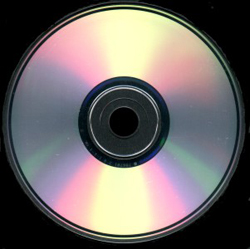 All of us use CD's & DVD's but most of them don’t know who invented and how it works
So. Let’s know about this
History:
David Paul Gregg first envisioned the optical or laser disc in 1958 and patented it in 1969.
Invention of CD:
James Russell invented the compact disk in 1965.
James Russell was granted a total of
22 patents for various elements of his compact disk system. In the early 1970s, using video Laser disc technology, Philips' researchers started experiments with "audio-only" optical discs, initially with wideband frequency modulation FM and later with digitized PCM audio signals. The compact disc was thus developed by Philips from its own 12 inch Philips Laser Vision discs. At the end of the 1970s, Philips, Sony, and other companies presented prototypes of digital audio discs.
In 1974, an initiative was taken by L. Otters, a director of the audio industry group within the Philips Corporation in Eindhoven, the Netherlands. A seven-person project group was formed to develop an optical audio disc with a diameter of 20 cm with a sound quality superior to that of the large and vulnerable vinyl record. In March 1974, during a meeting of the audio group, two engineers from the Philips research laboratory recommended the use of a digital format on the 20 cm optical disc, because an error-correcting code could be added. It wasn't until 1977 that the directors of the group decided to establish a laboratory with the mission of creating a small optical digital audio disc and a small player. They chose the term "compact disc" in line with another Philips product, the compact cassette. Rather than the original 20 cm size, the diameter of this compact disc was set at 11.5 cm, the diagonal measurement of a compact cassette.
However, the compact disk did not become popular until it was mass manufactured by Philips in 1980.
Invention of DVD:
DVD is the advanced version of CD which is evolved from the CD. It is a high-density CD.

DVDs were invented in the early 1990s (1993 is the answer shown on two different websites as a third said 1996), but they did not become popular until around the turn of the millennium. Until around 2001, people mostly still rented videocassettes. Their predecessor, laserdiscs, were available in the early 1990s (although they were very expensive and almost nobody had them), but they quickly became obsolete when the DVD was invented. Laser discs were like a hybrid of a vinyl record and a DVD: they were huge -- like 14 inch-wide -- DVDs with a big hole in the middle. Educational films were sometimes shown on them. Laserdisc players were basically just like DVD players- but much bigger.But the actual date The date of 'early 1990s' is the best to quote. DVDs came on the market in the UK about 1999. A presentation was given about 'a new video medium' (which turned out to be DVD) in early 1998.
Media type | Optical disc |
Capacity | 4.7 GB (single-sided, single-layer – common) 8.5–8.7 GB (single-sided, double-layer) 9.4 GB (double-sided, single-layer) 17.08 GB (double-sided, double-layer – rare) |
Read mechanism | 650 nm laser, 10.5 Mbit/s (1×) |


Write mechanism | 10.5 Mbit/s (1×) |
Standard | DVD Forum's DVD Books and DVD+RW Alliance specifications |
Disc shapes and diameters:
The digital data on a CD begins at the center of the disc and proceeds toward the edge, which allows adaptation to the different size formats available. Standard CDs are available in two sizes. By far, the most common is 120 millimeters (4.7 in) in diameter, with a 74- or 80-minute audio capacity and a 650 or 700 MB (737,280,000 bytes) data capacity. This capacity was reportedly specified by Sony executive Norio Ohga so as to be able to contain the entirety of Beethoven's Ninth Symphony on one disc. This diameter has been adopted by subsequent formats, including Super Audio CD, DVD, HD DVD, and Blu-ray Disc. 80 mm discs ("Mini CDs") were originally designed for CD singles and can hold up to 24 minutes of music or 210 MB of data but never became popular.[citation needed] Today, nearly every single is released on a 120 mm CD, called a Maxi single
Physical size | Audio Capacity | CD-ROM Data Capacity | Definition |
120 mm | 74–99 min | 650–870 MB | Standard size |
80 mm | 21–24 min | 185–210 MB | Mini-CD size |
85x54 mm - 86x64 mm | ~6 min | 10-65 MB | "Business card" size |
Inner structure OF a CD
A CD is a fairly simple piece of plastic, about four one-hundredths (4/100) of an inch (1.2 mm) thick. Most of a CD consists of an injection-molded piece of clear polycarbonate plastic. During manufacturing, this plastic is impressed with microscopic bumps arranged as a single, continuous, extremely long spiral track of data. We'll return to the bumps in a moment. Once the clear piece of poly carbonate is formed, a thin, reflective aluminum layer is sputtered onto the disc, covering the bumps. Then a thin acrylic layer is sprayed over the aluminum to protect it. The label is then printed onto the acrylic. A cross section of a complete CD (not to scale) looks like this:


Different types of CD, DVD
these Optical Disc are classified into many ways such as
CD': s-,
CD-R, CD-RW,
DVD's:-
DVD-R, DVD-RW, DVD+R DL, DVD+R, DVD-RAM, DVD+R DL, MINI DVD-R,
MINI DVD-R DL, MINI DVD+RW,
Blue Ray- BD-R, BD-R-DL, BD-RE
Uses:-
Ah.. Everyone know the uses of Cd&DVD, U can Use them as U wish (vadukunnodiki vadukunnantha):-)
So guys what you will say if any one asks you "who is inventor of CD/DVD?"
A: David Paul Gregg started invention in the year 1958 & James Russell invented the compact disk in 1965
Abbreviations:
CD: Compact Disc (Everyone knows it)
DVD: Digital Video Disc/Digital Video Disc
BR: Blu-ray (invented by Sony corp).
By-
Kishore Gupta
IT,GCTC.
How SIM card Works

A SIM card, also known as a subscriber identity module, is a subscriber identity
module application on a smart-card that stores data for GSM/CDMA Cellular telephone subscribers. Such data includes user identity, network authorization data, personal security keys, contact lists and stored text messages.
Security features include Authentication and encryption to protect data and prevent eavesdropping.
Security features include Authentication and encryption to protect data and prevent eavesdropping.
1) Identification of a subscriber: The IMSI programmed on the SIM card, is the
identity of a subscriber. Each IMSI is mapped to a mobile number and
provisioned on the HLR to allow a subscriber to be identified.identity of a subscriber. Each IMSI is mapped to a mobile number and
2) Authentication of a subscriber: This is a process, where, using the
authentication algorithm (COMP128V3 for 2/2.5 G GSM, CAVE for CDMA and
Mileage for 3G) on the SIM card, a unique response is provided by each
subscriber based on IMSI, Ki (stored on SIM) and RAND (provided by network).
By matching this response with values computed on the network a legal
subscriber is logged on to the network and he or she can now make use the
services of the mobile service provider.
3) Storage: To store phone numbers and SMS.
4) Applications: The SIM Tool Kit or GSM 11.14 standard allows creating
applications on the SIM to provide basic information on demand and other
applications for m-commerce, chatting, cell broadcast, phonebook backup,
location based services etc.
Typical Diagram of Sim Card
A Sim Card have six pads that also corresponds to the six SIM connectors pins, but only five has totally have connection on the entire layout.
SIM DATA - this is a digital data that being stored on a SIM memory
SIM Clock - this is a clock frequency signal that being synchronize to the digital data to create data signal in order transfer or sends and receive data information.
SIM Reset - this is also a frequency signal that triggers or reset all synchronization process.
SIM DATA - this is a digital data that being stored on a SIM memory
SIM Clock - this is a clock frequency signal that being synchronize to the digital data to create data signal in order transfer or sends and receive data information.
SIM Reset - this is also a frequency signal that triggers or reset all synchronization process.

VSIM B+ Supply Voltage- This a power supply voltage used to activated the SIM circuit.
SIM Ground - a ground line voltage
The smartcard with Subscriber identity module application is generally known as
SIMCARD. But, In reality, the SIM is effectively a mass-market smart card.
SIM Ground - a ground line voltage
The smartcard with Subscriber identity module application is generally known as
SIMCARD. But, In reality, the SIM is effectively a mass-market smart card.
PIN and PUK:
PIN –Personal Identification Number
PIN –Personal Identification Number
2 PINs exist (PIN 1 and PIN2)
Limited attempts on PIN access
PUK –PIN Unblocking Code
Resetting PUK, resets PIN and the attempt counter
Too many attempts on PUK blocks use permanently.
PUK –PIN Unblocking Code
Resetting PUK, resets PIN and the attempt counter
Too many attempts on PUK blocks use permanently.
Two ways of Storing Data in SIM
1. As GSM Files
The data used for Telco and GSM operation are all stored over the files.
Telco/operator can change the Data this file through RFM in a secure channel.
Only upon successful verification of file access condition a file can be read.
All files are protected by access conditions.
2. As application data within an STK application as instance data.
mChek stores all its secured encrypted information within application data. All the
information stored is in persistent objects. Only mChek Server can access these
data through mChek OTA platform.
1. As GSM Files
The data used for Telco and GSM operation are all stored over the files.
Telco/operator can change the Data this file through RFM in a secure channel.
Only upon successful verification of file access condition a file can be read.
All files are protected by access conditions.
2. As application data within an STK application as instance data.
mChek stores all its secured encrypted information within application data. All the
information stored is in persistent objects. Only mChek Server can access these
data through mChek OTA platform.
Subscribe to:
Posts (Atom)